AWS Reserved Instances vs Savings Plans: A Decision Guide for Engineers
AWS Reserved Instances vs Savings Plans compared: real pricing, break-even math, a decision framework, and what a 3-year commitment actually costs you.

Xplorr team
The people who build Xplorr
In this post
- What is the difference between a Reserved Instance and a Savings Plan?
- What does each option cost? (m5.xlarge, us-east-1)
- Three things the price table tells you
- How does each option actually work?
- What do Standard Reserved Instances lock you into?
- Are Convertible Reserved Instances still worth buying?
- What do EC2 Instance Savings Plans cover?
- What do Compute Savings Plans cover?
- What utilization do you need to break even?
- Does the flexible option break even later?
- When should you not buy a commitment?
- Which commitment should you buy?
- Why is a 3-year Standard RI hard to undo?
- What would have prevented it?
- How do you build a commitment strategy?
- Step 1: Measure baseline usage
- Step 2: Commit to the floor, not the average
- Step 3: Layer your commitments
- Step 4: Monitor coverage
- Quick reference: which to buy
- What should you buy first?
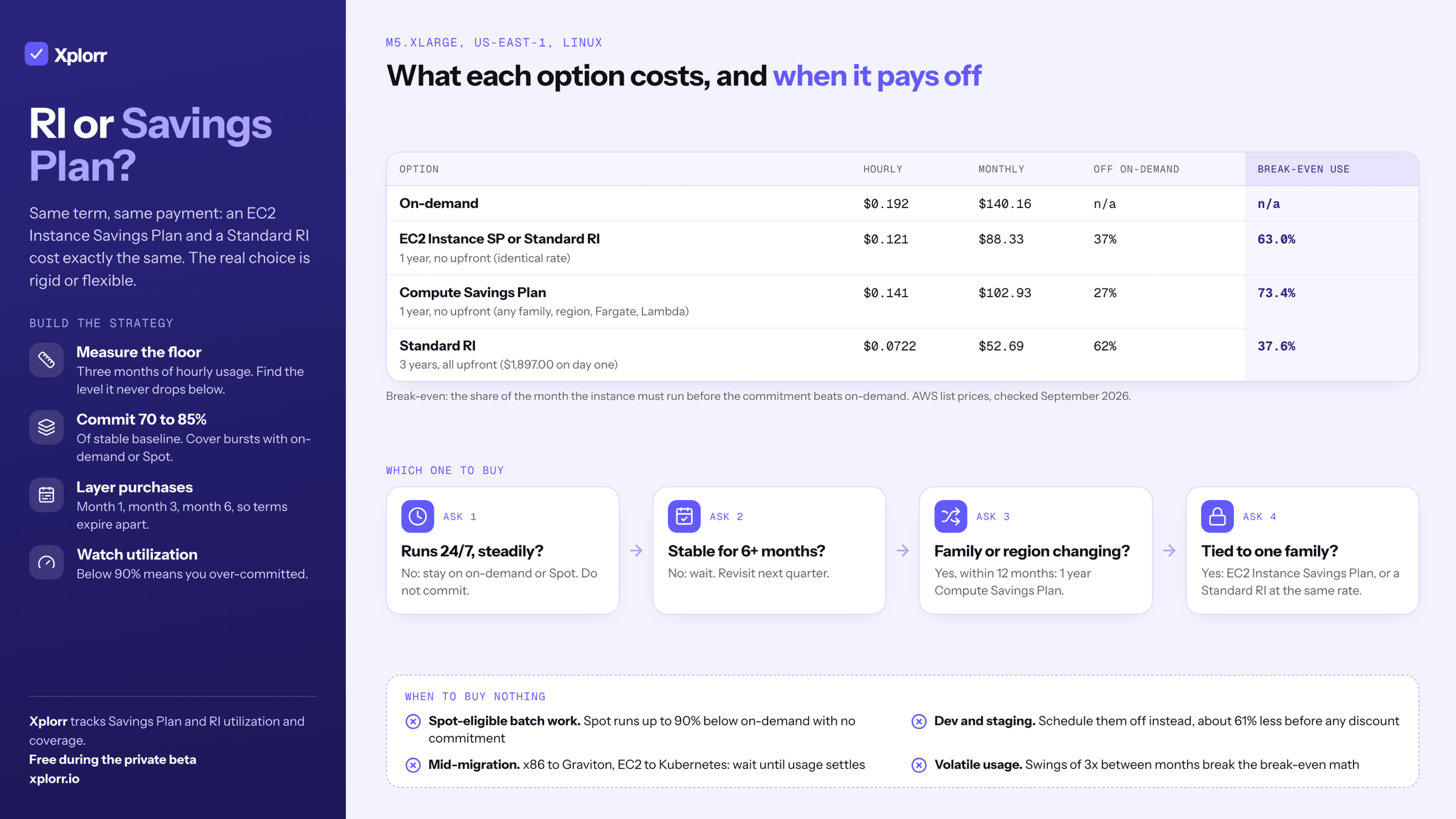
Buy an EC2 Instance Savings Plan when your fleet stays in one instance family, and a Compute Savings Plan when it will not. At matched term and payment option, an EC2 Instance Savings Plan and a Standard Reserved Instance cost exactly the same in us-east-1, so the RI only wins if you need a zonal capacity reservation or want the option to resell.
The reason this feels harder than it is: AWS presents dozens of combinations of term length, payment option, instance family, region and tenancy, and the flexible option is priced far enough above the rigid one that the choice is a real trade-off rather than a formality. Below are the current list rates, the break-even math, and the cases where buying nothing is correct.
What is the difference between a Reserved Instance and a Savings Plan?
Reserved Instances are a commitment to a specific instance configuration. You say “I will run an m5.xlarge in us-east-1 for the next year” and AWS gives you a discount.
Savings Plans are a commitment to a dollar amount of compute per hour. You say “I will spend at least $0.10/hour on compute for the next year” and AWS gives you a discount on usage up to that amount.
That’s the fundamental distinction. RIs lock you to a specific instance type, with some size flexibility inside the family. Savings Plans lock you to a spending level but let you shift what you’re running underneath.
What does each option cost? (m5.xlarge, us-east-1)
An m5.xlarge is 4 vCPU and 16 GB of RAM. Here is what it costs under each model on Linux with shared tenancy. Upfront payments are amortised over the term to give a comparable hourly rate.
| Pricing model | Effective hourly | Monthly (730 hrs) | Annual | Savings vs on-demand |
|---|---|---|---|---|
| On-demand | $0.192 | $140.16 | $1,681.92 | n/a |
| 1-yr Standard RI, no upfront | $0.121 | $88.33 | $1,059.96 | 37% |
| 1-yr Standard RI, all upfront | $0.1129 | $82.42 | $989.00 | 41% |
| 3-yr Standard RI, no upfront | $0.083 | $60.59 | $727.08 | 57% |
| 3-yr Standard RI, all upfront | $0.0722 | $52.69 | $632.33 | 62% |
| 1-yr Compute SP, no upfront | $0.141 | $102.93 | $1,235.16 | 27% |
| 1-yr EC2 Instance SP, no upfront | $0.121 | $88.33 | $1,059.96 | 37% |
| 3-yr Compute SP, no upfront | $0.097 | $70.81 | $849.72 | 49% |
| 3-yr EC2 Instance SP, no upfront | $0.083 | $60.59 | $727.08 | 57% |
Prices checked September 2026, us-east-1, Linux, shared tenancy, from the AWS Price List API.
Three things the price table tells you
EC2 Instance Savings Plans and Standard RIs are priced identically. Not “nearly”: at the same term and payment option the rate is the same number, $0.121/hr for 1-year no upfront and $0.083/hr for 3-year. AWS wants you on Savings Plans, so it removed any price reason to prefer an RI. What the RI still gives you is a zonal capacity reservation and the option to resell, which a Savings Plan cannot do.
Compute Savings Plans are not a 1% premium. At 1-year no upfront, a Compute SP is $0.141/hr against $0.121/hr for the EC2 Instance SP. That is 17% more per hour, and it turns a 37% discount into a 27% one. Family and region flexibility is worth buying, but price it as ten points of discount, not as a rounding error.
A 3-year term adds about 20 points, not double. Standard RIs go from 37% to 57% at no upfront, Compute SPs from 27% to 49%. You are tripling the lock-in for roughly half again the discount.
How does each option actually work?
What do Standard Reserved Instances lock you into?
You commit to a specific combination of instance type, region, platform (Linux or Windows) and tenancy.
Within an instance family, you get size flexibility. If you buy an m5.xlarge RI but run an m5.2xlarge, the RI covers half of it. If you run two m5.large instances, the RI covers both. This normalization uses a unit system where m5.large = 4 units, m5.xlarge = 8 units, and so on.
What you can’t change: instance family (m5 to m6i), region, or platform.
Are Convertible Reserved Instances still worth buying?
Convertible RIs can be exchanged for a different instance family, OS or tenancy, as long as the new RI has equal or greater value. The trade-off is a smaller discount: 27% for 1-year no upfront against 37% for a Standard RI.
That 27% is the same discount a 1-year no-upfront Compute Savings Plan gives you, and the Compute SP applies automatically across families, regions, Fargate and Lambda with no exchange paperwork. Convertible RIs are rarely the right answer any more.
What do EC2 Instance Savings Plans cover?
You commit to a $/hour spend on a specific instance family in a specific region. For example: “$0.10/hour of m5 usage in us-east-1.”
You get size flexibility within the family (m5.large, m5.xlarge, m5.2xlarge all count). You don’t get family flexibility. If you migrate from m5 to m6i, the plan doesn’t apply.
What do Compute Savings Plans cover?
You commit to a $/hour spend on any compute, anywhere. EC2 in any family and any region, plus Fargate and Lambda, all qualify.
This is the most flexible option. If you migrate from m5.xlarge in us-east-1 to m7g.xlarge in eu-west-1, the plan still applies. If you move a workload from EC2 to Fargate, it still applies. You pay ten points of discount for that.
What utilization do you need to break even?
Commitment pricing only saves money if you actually use what you committed to. The break-even is the share of the month an instance must run before the commitment beats on-demand.
For a 1-year no upfront EC2 RI on m5.xlarge:
RI hourly cost:    $0.121
On-demand hourly:  $0.192
Monthly RI cost:   $0.121 × 730 = $88.33

Break-even hours = $88.33 / $0.192 = 460.1 hours
Break-even utilization = 460.1 / 730 = 63.0%
If the instance runs more than 63% of the time (about 15 hours a day), the RI saves you money. If it runs less, on-demand would have been cheaper.
For a 3-year all upfront EC2 RI, the upfront charge is $1,897.00 for the full term:
Equivalent monthly: $1,897.00 / 36 = $52.69

Break-even hours = $52.69 / $0.192 = 274.4 hours/month
Break-even utilization = 274.4 / 730 = 37.6%
The longer the term and the more you pay upfront, the lower the break-even. A 3-year all-upfront RI breaks even at 37.6% utilization, but you are locked in for three years.
Does the flexible option break even later?
Yes, and by more than most write-ups admit. A 1-year no-upfront Compute Savings Plan on the same instance:
$102.93 / $0.192 / 730 = 73.4%That is 10 points worse than the EC2 Instance SP or Standard RI at 63.0%. An instance that runs 18 hours a day clears the RI break-even and misses the Compute SP one. If you are confident the instance family will not move for a year, the rigid product is meaningfully cheaper, and the flexibility premium is only worth paying when a migration is actually on the roadmap.
When should you not buy a commitment?
This matters more than the comparison table. There are specific situations where on-demand or Spot is the right answer, and buying commitments costs you money.
Volatile or unpredictable workloads. If your compute usage swings 3x between months, don’t commit. The break-even math assumes consistent utilization, and wild swings break the model.
Early-stage companies with under 18 months of stable infrastructure. Your architecture will change, your instance types will change, your regions might change. Wait until your infrastructure has been stable for at least two quarters.
Active architecture migration. If you’re mid-move from x86 to Graviton, from EC2 to Kubernetes, or from self-managed to managed services, hold off until usage has stabilized.
Dev and staging environments. These should not run 24/7 in the first place. A 13-hour weekday schedule runs about 283 of the 730 hours in a month, so switching them off cuts roughly 61% before you buy anything.
Anything Spot-eligible. For fault-tolerant batch work, Spot Instances go up to 90% below on-demand with zero commitment. CI/CD, data processing, rendering and training jobs beat any commitment plan on Spot.
Which commitment should you buy?
Use this flow to decide:
START
  │
  ├── Is this workload running 24/7 with consistent utilization?
  │     ├── NO → Use on-demand or Spot. Don't commit.
  │     └── YES ↓
  │
  ├── Has the workload been stable for 6+ months?
  │     ├── NO → Wait. Use on-demand. Revisit next quarter.
  │     └── YES ↓
  │
  ├── Are you planning to change instance families or regions
  │   in the next 12 months?
  │     ├── YES → Buy 1-year Compute Savings Plan (27% off, most flexible)
  │     └── NO ↓
  │
  ├── Is the workload tied to a specific instance family?
  │     ├── YES → Buy EC2 Instance Savings Plan (37% off)
  │     │         or Standard RI at the same rate
  │     └── NO → Buy Compute Savings Plan
  │
  └── Term length?
        ├── High confidence for 3 years → 3-year (49–62% off)
        ├── Moderate confidence → 1-year (27–41% off)
        └── Uncertain → Don't commit. Revisit in 3 months.
When in doubt, start with a 1-year EC2 Instance Savings Plan, no upfront, on the family you are certain about, and leave the rest on-demand. It is the cheapest commitment that carries no cash outlay, and it costs you nothing in discount versus a Standard RI.
Why is a 3-year Standard RI hard to undo?
Take a production fleet of twenty m5.xlarge instances in us-east-1. At the $0.192/hr on-demand list price, that fleet is 20 x 0.192 x 8,760 = $33,638.40 a year, or $100,915.20 across a three-year term. Covering it with 3-year Standard RIs, all upfront, costs 20 x $1,897.00 = $37,940 paid on day one and locks the instance family for the full term.
Now suppose that six months in, a Graviton generation benchmarks better on price-performance for your workload, and your application runs on ARM without changes. You cannot move. A Standard RI cannot be converted to a different instance family, and for the remaining 2.5 years you have three options, none of them good:
-
Sell on the RI Marketplace. Only Standard RIs are eligible, Convertible RIs are not, and AWS charges a 12% service fee on the total upfront price of each RI you sell. AWS defaults to dropping your listed price in equal increments month over month, so a reservation with 30 months left is worth materially less than you paid. There is also a lifetime cap per account: at most $50,000 and 5,000 Reserved Instances, ever.
-
Run both and eat the loss. Pay on-demand for the new instances while the unused RIs keep billing. You are paying twice for the same capacity.
-
Wait it out. Keep running the old family until the term expires and forgo the newer generation’s savings for 2.5 years.
What would have prevented it?
- Buy 1-year terms instead of 3-year. You give up about 20 points of discount and gain the ability to re-evaluate annually.
- Use a Compute Savings Plan instead of a Standard RI. It would have applied to the Graviton instances automatically, at a 10 point cost.
- Commit to only 70–80% of steady-state usage, leaving headroom for changes.
The discount on a 3-year all-upfront Standard RI is real. So is the fact that the option to change your mind is exactly what you sold in exchange for it.
How do you build a commitment strategy?
Step 1: Measure baseline usage
Pull 3 months of hourly EC2 usage from Cost Explorer and identify the minimum sustained usage: the floor that never drops, even during low-traffic periods. Xplorr’s savings coverage view shows how much of that floor is already under a commitment before you buy more.
aws ce get-cost-and-usage \
  --time-period Start=2025-12-01,End=2026-03-01 \
  --granularity HOURLY \
  --metrics "UsageQuantity" \
  --group-by Type=DIMENSION,Key=INSTANCE_TYPE \
  --filter '{
    "Dimensions": {
      "Key": "SERVICE",
      "Values": ["Amazon Elastic Compute Cloud - Compute"]
    }
  }' \
  --output json > ec2_usage.json
Step 2: Commit to the floor, not the average
If your baseline is 20 m5.xlarge instances but you regularly burst to 35, commit to 15–17 instances (70–85% of baseline) and cover the rest with on-demand or Spot.
Over-committing is the most expensive mistake in commitment purchasing. Under-committing just means you pay on-demand for the gap, which is where you started.
Step 3: Layer your commitments
Don’t buy everything at once. Stagger the purchases:
- Month 1: cover 50% of stable baseline
- Month 3: review and add EC2 Instance SPs for workloads that haven’t changed
- Month 6: fill the remaining gap based on six months of data
Layering means your commitments expire at different times, giving you regular opportunities to re-evaluate.
Step 4: Monitor coverage
Check Savings Plans utilization weekly, in Cost Explorer under Savings Plans → Utilization Report.
aws ce get-savings-plans-utilization \
  --time-period Start=2026-03-01,End=2026-03-18 \
  --output table
If utilization drops below 90%, investigate. Either you over-committed, or your usage pattern changed and the next purchase needs adjusting. Commitments in Xplorr tracks Savings Plan and Reserved Instance utilization so that drop is visible without running the command.
Quick reference: which to buy
| Scenario | Recommendation |
|---|---|
| Stable EC2 fleet, same instance family for 1+ year | EC2 Instance Savings Plan, 1-year, no upfront (37%) |
| Mixed compute (EC2 + Fargate + Lambda) | Compute Savings Plan, 1-year, no upfront (27%) |
| Absolutely certain about instance type for 3 years | Standard RI or EC2 Instance SP, 3-year, all upfront (62%) |
| Need a zonal capacity reservation as well as a discount | Standard RI (a Savings Plan reserves no capacity) |
| Planning Graviton migration | Compute Savings Plan (covers both x86 and ARM) |
| Mostly Spot-eligible workloads | Don’t buy commitments. Use Spot. |
| Less than 6 months of stable usage data | Don’t buy commitments yet. Wait. |
| Dev/staging environments | Don’t buy commitments. Schedule shutdown instead. |
What should you buy first?
The best commitment strategy is the boring one: start small, go short-term, buy the rigid product where you are certain and the flexible one only where a migration is genuinely planned, and increase commitment as confidence grows.
A 37% discount you fully utilize is worth more than a 62% discount on a 3-year RI you end up listing on the marketplace at a loss eight months in. The engineers who get burned are the ones who optimized for the headline percentage without pricing what might change.
If tracking all of this across multiple accounts and instance families sounds tedious, it is. Tools like Xplorr can continuously monitor your usage patterns and recommend the right commitment level automatically. But the framework above gives you everything you need to make the decision yourself.
Keep reading
- AWS Cost Optimization Strategies That Actually Work
- Cloud Cost Optimization for Startups: A Guide by Stage
- How to Cut Your AWS Bill in One Week: A Practical Checklist
See how Xplorr helps → Features
Xplorr shows your AWS, Azure and GCP spend in one place, with anomaly detection, budgets and rightsizing recommendations. Get started free.
Written by
Xplorr team
The people who build Xplorr
Written together by the engineers who build Xplorr: the AWS, Azure, GCP and Kubernetes collectors, the console, and the alerting behind them.
About Xplorr