Check the invoice against the usage before you pay it
Cost tooling usually stops at usage data, which leaves finance to trust that the numbers tie out to the actual bill. Xplorr keeps the provider invoice and the synced cost data side by side, matches them per account, and where they disagree it explains the difference by charge category instead of leaving you with two totals.
Inputs
Where the Invoices numbers come from
Xplorr reads your accounts with read only credentials and never writes to your infrastructure. These are the sources behind this screen.
- Provider invoices
- Invoices are synced from the connected accounts, and one can be uploaded directly where a provider does not expose it through an API.
- The cost data Xplorr already synced
- The other side of the comparison is the usage level cost Xplorr collected daily through the month, from Cost Explorer, Azure Cost Management and the GCP billing export.
- Charge categories
- Tax, credits, refunds and other non usage charges are read as their own categories, because these are usually the reason a bill and a usage total do not agree.
Method
How the Invoices numbers are worked out
No black box. If a figure is an estimate or an apportionment rather than a billed line, the page says so.
Invoices are matched per account, not in aggregate
Each invoice is tied to the account it belongs to and compared against that account. A single organisation level total can net two errors against each other and look correct, which per account matching does not.
Variance is measured against a threshold
Small differences are expected from rounding and timing, so an account is marked matched when it falls within a threshold, and flagged for review when it does not. The point is to surface the few accounts worth looking at.
The difference is broken down by charge category
Where a variance exists, it is attributed to a category rather than reported as a single number, so the answer to why the invoice is higher than the usage is on the page.
Subtotal and tax are kept apart
Usage data is pre tax. Keeping subtotal, tax and total as separate columns is what makes the comparison against usage a like for like one.
Where each invoice comes from, and where GCP differs
AWS invoices are read from the Invoicing API using the payer account, and Azure invoices from the Billing API against a billing account named in the settings. Google publishes no invoice API for ordinary billing accounts, so GCP invoices are uploaded as CSV and then reconcile exactly like a synced one. Xplorr does read the GCP Cloud Billing budget for the period and shows it beside reconciliation as a hint, but it is never treated as an invoice.
The comparison is run on two bases
The invoice subtotal is compared against the platform total with the tax category taken out, and the invoice total against the platform total with it left in. An account counts as matched when either basis falls inside the threshold, which defaults to one percent, because agreement types differ in what they put into a subtotal.
No invoice and no data are different results
Reconciliation ends in one of four states: matched, variance, missing invoice, or missing data. Separating the last two matters, because an account the provider has not invoiced yet and an account whose cost sync returned nothing look identical if you only compare two totals.
In the console
What is on the Invoices screen
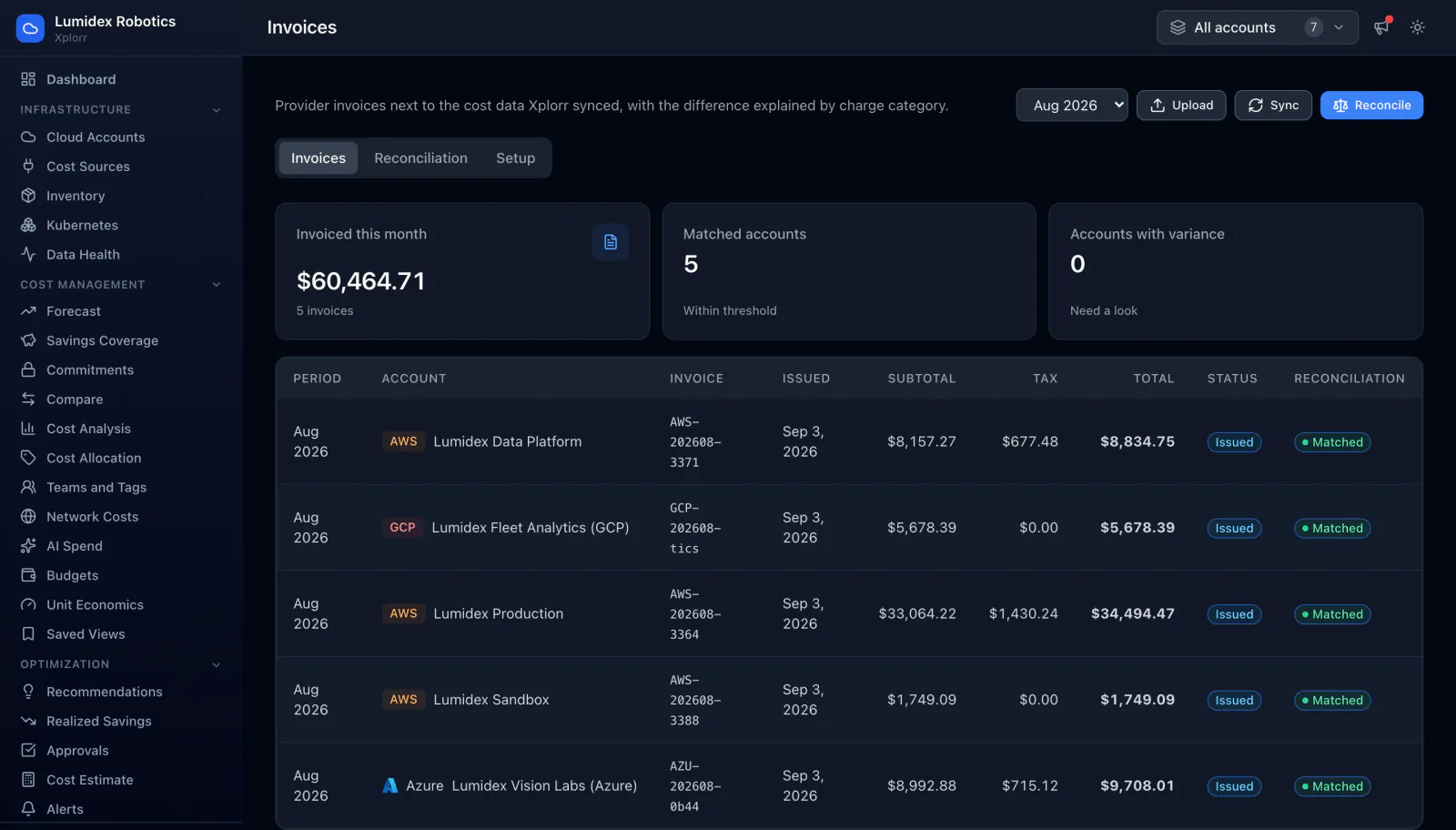
- Total invoiced for the month and the number of invoices behind it
- A count of matched accounts and of accounts with a variance to review
- One row per invoice with period, account, invoice number and issue date
- Subtotal, tax and total as separate columns
- Issue status and a reconciliation badge per row
- A reconciliation tab for the detail, plus sync, upload and reconcile actions
- Month selector, so a closed period can be revisited
Common questions about Invoices
Why would the invoice differ from the cost data at all?
Can I reconcile a provider that does not expose invoices through an API?
Does this replace our accounting system?
When does last month's invoice appear?
Why is tax zero on some Azure invoices?
What access does invoice sync need?
Background reading
Why reconciling a GCP invoice starts from a CSV upload, since Google has no invoice API for ordinary billing accounts, is explained in What building cloud cost integrations teaches you.
Related features
How this compares
See this on your own accounts
Connect a cloud account with read only credentials and the first sync pulls your last 30 days, so this screen fills with your numbers instead of the demo workspace. Free during beta.