Connect an account with read only access and nothing else
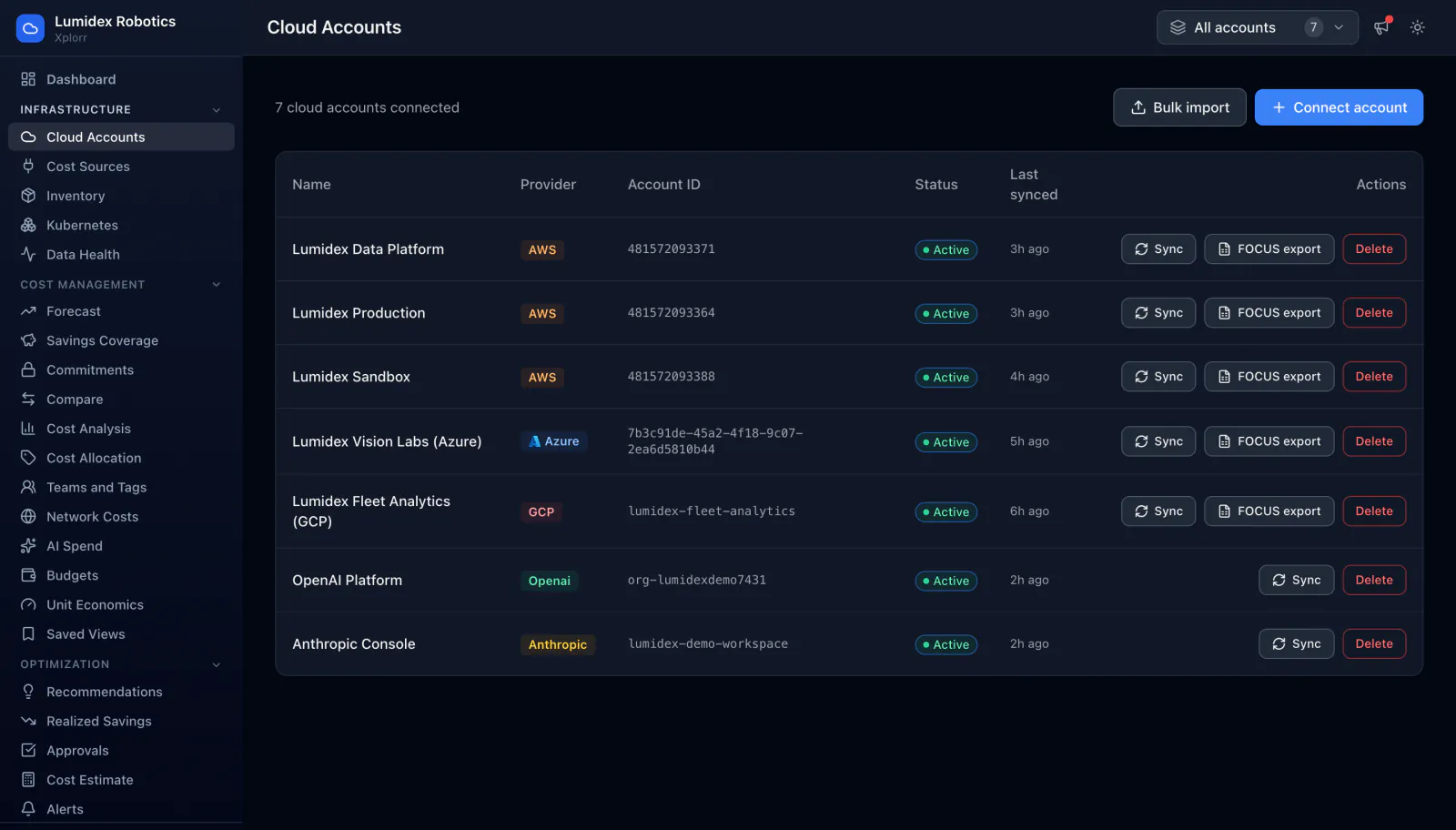
Xplorr reads your accounts and never writes to them. Each connected AWS account, Azure subscription, GCP project and AI provider workspace appears in one list with its native account identifier, its status and when it last synced, and each cloud account can read the FOCUS billing export your cloud already writes.
Inputs
Where the Cloud Accounts numbers come from
Xplorr reads your accounts with read only credentials and never writes to your infrastructure. These are the sources behind this screen.
- A read only role or credential per provider
- AWS connects through a role, Azure through a subscription scoped credential and GCP through a project, each granted read access only. Xplorr has no permission to create, change or delete anything in your account.
- The provider billing and resource interfaces
- Once connected, an account supplies both its billing data and its resource inventory, which is why one connection is enough to populate the cost pages and the inventory at the same time.
- AI provider workspaces
- OpenAI and Anthropic connect as accounts in their own right, so their spend lands in the same totals as the three clouds rather than in a spreadsheet beside them.
Method
How the Cloud Accounts numbers are worked out
No black box. If a figure is an estimate or an apportionment rather than a billed line, the page says so.
Each account keeps its native identifier
An AWS account stays a 12 digit account ID, an Azure subscription stays a GUID and a GCP project stays a project ID. Keeping the identifier the provider uses is what lets you match a row here against the console you already have open.
Accounts sync independently
Each account syncs on its own and records when it last succeeded, so one provider being slow or unreachable does not hold up the others or make the whole workspace look stale.
A new account pulls 30 days on connection
Connecting an account triggers an initial 30 day sync rather than starting from today, so trends and comparisons have something to work with straight away. Providers also publish with a lag, so the most recent day or two fills in afterwards.
Cloud accounts can read a FOCUS billing export
FOCUS is the FinOps Foundation open specification for cost and usage data, designed so billing from different providers shares one column layout. AWS Data Exports, Azure Cost Management exports and the Google Cloud BigQuery billing export can all write it, and Xplorr reads that export from S3, Azure storage or BigQuery.
In the console
What is on the Cloud Accounts screen
- How many accounts are connected, across every provider
- Name, provider, native account identifier and status per account
- How long ago each account last synced
- An on demand sync control per account
- A FOCUS export setting on each cloud account, pointing Xplorr at the export your cloud writes
- Connecting a single account, or bulk importing several at once
Common questions about Cloud Accounts
What access does Xplorr need?
What is the FOCUS export setting?
Do I get history straight away, or only from the day I connect?
Can I connect many accounts at once?
Background reading
Connecting an account is the first screen in Inside the Xplorr demo workspace, a walkthrough of the console using seeded sample data.
What each provider's billing API returns, and what it leaves out, is in What building cloud cost integrations teaches you.
Related features
How this compares
See this on your own accounts
Connect a cloud account with read only credentials and the first sync pulls your last 30 days, so this screen fills with your numbers instead of the demo workspace. Free during beta.