Write the tagging rule down, then measure who follows it
Tagging standards usually live in a wiki page nobody scores. Tag Governance turns each rule into a policy with a tag key, whether it is required, which values are allowed and which resources it applies to, then checks your resources against it and reports a compliance score per policy, per account and over time.
Inputs
Where the Tag Governance numbers come from
Xplorr reads your accounts with read only credentials and never writes to your infrastructure. These are the sources behind this screen.
- Tags synced from your providers
- The tags being scored are the real ones on your AWS, Azure and GCP resources, synced alongside the billing and inventory data rather than maintained as a separate copy that drifts.
- Resource inventory
- A compliance score needs a denominator. Inventory supplies the set of resources a policy applies to, which is what makes a missing tag countable rather than invisible.
- The policies you define
- Each policy names a tag key, says whether it is required, optionally lists the allowed values, and sets which resources it covers. Nothing is scored against a standard Xplorr invented for you.
Method
How the Tag Governance numbers are worked out
No black box. If a figure is an estimate or an apportionment rather than a billed line, the page says so.
Every applicable resource is checked against every policy
One check is one resource evaluated against one policy. The totals on the page are counts of those checks, which is why the number of checks is much larger than the number of resources.
A missing tag and a wrong value are different failures
Missing required tags and invalid values are counted separately because they need different fixes. A missing tag is an untagged resource. An invalid value is someone tagging env as prod when the policy allows production, which no amount of tagging discipline catches without an allowed value list.
The score is compliant checks over total checks
Compliance is the share of checks that passed, reported for the whole organisation, per policy and per account. Because it is a ratio of checks, a policy covering few resources cannot swamp one covering many.
The score is recorded over time, not just now
Scores are kept per day so the trend line shows whether tagging practice is improving. A single score tells you where you stand, and only the trend tells you whether the standard is actually being adopted.
In the console
What is on the Tag Governance screen
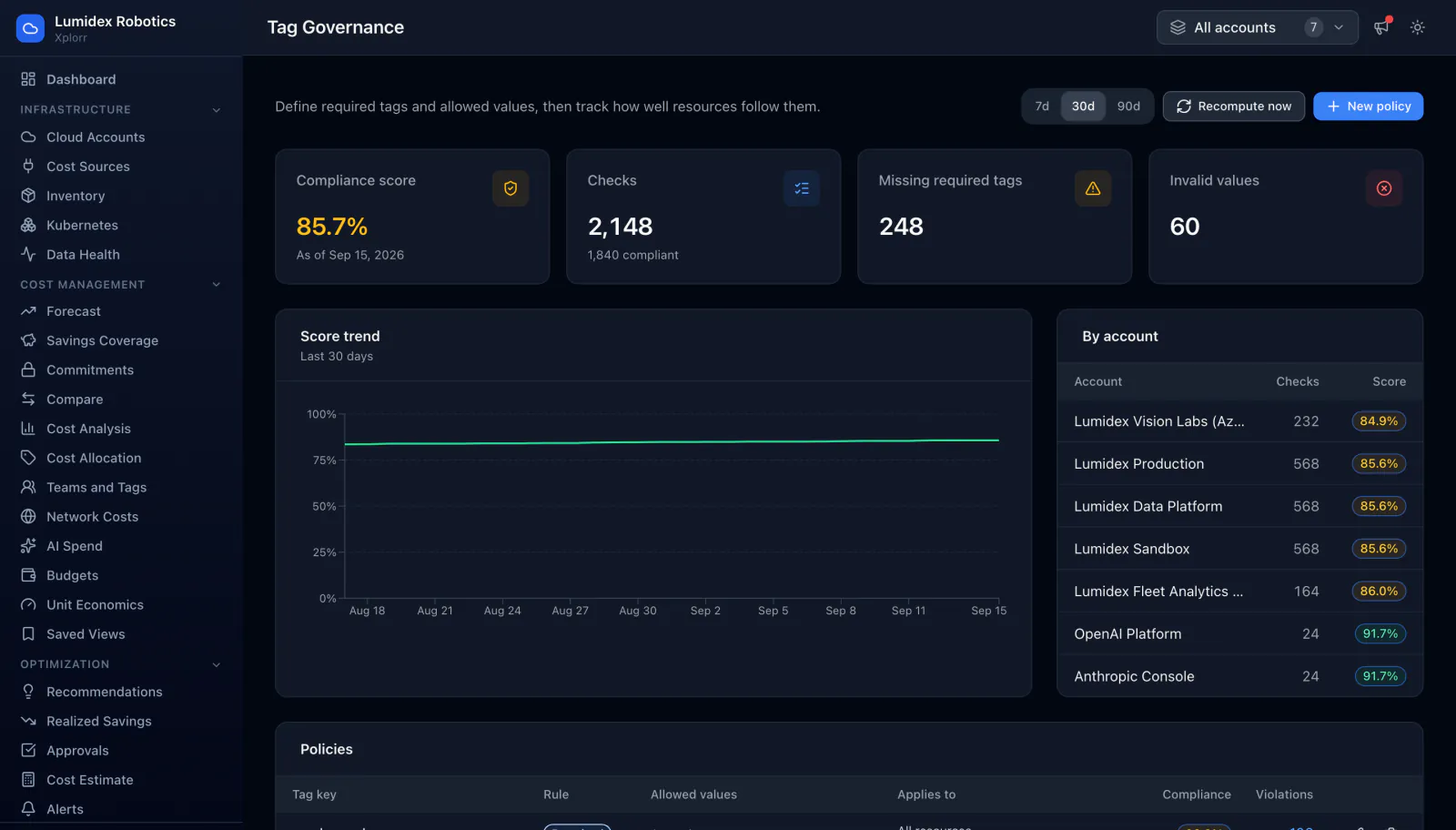
- Overall compliance score with the date it was computed
- Total checks run and how many of them were compliant
- Missing required tags and invalid values as separate counts
- A score trend line over the selected window
- A per account table of checks and score, so you can see which account drags the total down
- A policies table with tag key, rule, allowed values, scope, compliance and violation count
- Windows of 7, 30 or 90 days, a recompute control, and editing for each policy
Common questions about Tag Governance
Does Xplorr change tags on my resources?
What is the difference between a missing tag and an invalid value?
Do I need policies before cost allocation works?
Why score per account as well as overall?
Background reading
Why tag compliance scores drift and how to make a tagging policy stick is covered in FinOps best practices for engineering teams.
Related features
How this compares
See this on your own accounts
Connect a cloud account with read only credentials and the first sync pulls your last 30 days, so this screen fills with your numbers instead of the demo workspace. Free during beta.