Turn a cost total into something you can actually charge on
Showback tells a team what it spent. Rebilling has to survive that team checking the arithmetic. Xplorr assigns spend to a team, business unit or customer through ordered rules, splits shared platform cost across them rather than leaving it in an unowned bucket, and applies a markup per value so the figure you pass on is derived rather than typed into a spreadsheet.
Inputs
Where the Rebilling numbers come from
Xplorr reads your accounts with read only credentials and never writes to your infrastructure. These are the sources behind this screen.
- Assigned spend from your cost categories
- Rebilling runs on the categories you already define for teams, business units or customers, so the thing being charged on is the same grouping the cost pages report against.
- The owner attached to each value
- A value can carry an owner address, which is what makes a figure something with a recipient rather than a row in a table nobody is accountable for.
- Billed cost from every connected provider
- The underlying figure is billed cost from AWS, Azure, GCP and the connected AI sources, not an estimate, which matters when the number is going to be recharged to somebody.
Method
How the Rebilling numbers are worked out
No black box. If a figure is an estimate or an apportionment rather than a billed line, the page says so.
Every cost line lands in exactly one place
Assignment rules run top to bottom and the first match wins, so a line is claimed once. That single match property is what makes category totals reconcile against the provider bill, which is the first thing anyone being charged will check.
Shared cost is split deliberately, not absorbed
Platform cost that belongs to no single team goes into a value marked as a shared pool, and that pool is divided across the other values. Making it an explicit setting is the difference between a split you can explain and one somebody discovers later.
Markup is applied per value
Each value carries its own markup percentage, applied on top of the cost assigned to it. Different customers or internal units rarely warrant the same margin, so the rate lives with the value rather than as one global number.
The marked up figure stays traceable to the raw cost
Because markup is a percentage applied to an assigned total rather than a manually entered amount, the charge can always be decomposed back into the underlying cost and the rate that produced it.
The result is previewed before it goes out
A category and its splits can be reviewed against real spend before the numbers reach a report. A rule ordering mistake is cheap to fix as a draft and expensive to fix after an invoice.
In the console
What is on the Rebilling screen
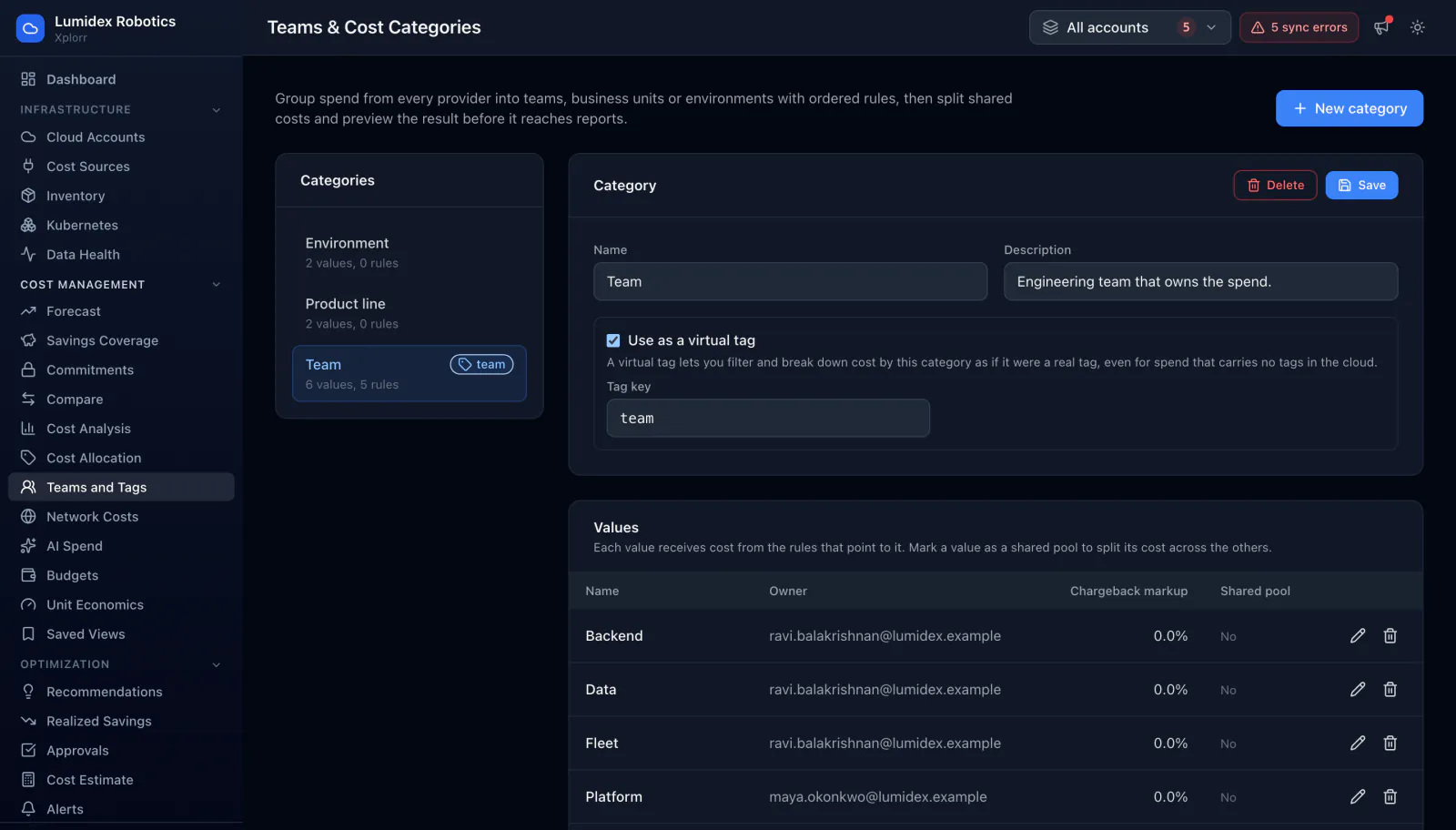
- Each value with its owner, its chargeback markup and whether it is a shared pool
- Markup set as a percentage per value rather than one rate for everything
- A shared pool toggle per value, splitting that cost across the others
- Ordered assignment rules, with the first match deciding where a cost lands
- A preview of the assigned and split result before it reaches reports
- Categories reusable across teams, business units, environments or customers
Common questions about Rebilling
What is the difference between showback and rebilling?
How is shared platform cost handled?
Can different teams or customers carry different markups?
Does Xplorr send the invoice?
Background reading
Showing each team what it costs before charging it back is the cost ownership habit described in FinOps best practices for engineering teams.
Related features
How this compares
See this on your own accounts
Connect a cloud account with read only credentials and the first sync pulls your last 30 days, so this screen fills with your numbers instead of the demo workspace. Free during beta.