The bill is not only AWS, Azure and GCP any more
Model APIs and observability tools now sit beside infrastructure as real line items, and they usually get tracked in a spreadsheet. Cost Sources connects them directly, so OpenAI, Anthropic and Datadog spend appears in every cost view, budget and anomaly check next to your cloud accounts rather than beside them.
Inputs
Where the Cost Sources numbers come from
Xplorr reads your accounts with read only credentials and never writes to your infrastructure. These are the sources behind this screen.
- The OpenAI Usage and Costs APIs
- API spend, tokens and requests are read per project and per model from the OpenAI organization Usage and Costs APIs, which is the level of detail that makes a cost per model question answerable.
- The Anthropic Admin API
- Claude API spend and token usage come from the Anthropic Admin API usage and cost reports, broken down per workspace and per model.
- The Datadog Usage Metering API
- Estimated daily Datadog spend per product, covering hosts, logs, APM, synthetics and more, is read from the Usage Metering API. The key must belong to the parent organization, needs the usage_read and billing_read scopes, and metering is available on Pro and Enterprise plans.
- Snowflake and Databricks usage
- Warehouse spend is read from each platform own usage tables, so a data platform bill sits in the same totals as infrastructure rather than being reconciled separately at month end.
Method
How the Cost Sources numbers are worked out
No black box. If a figure is an estimate or an apportionment rather than a billed line, the page says so.
Each source keeps its own sync and its own data boundary
A source records when it last synced and the date its data runs through, which are different questions. A sync an hour ago that only carries data to two days back is a fact worth seeing rather than hiding behind a green tick.
Connected spend flows into the shared totals
Once a source is connected it is not a separate report. Its spend joins the same cost views, budgets and anomaly baselines as cloud spend, so a budget covers what you actually spend rather than only the infrastructure part of it.
Estimated figures are labelled as estimated
Datadog spend arrives from a usage metering interface as an estimated daily figure per product, not an invoice line, and the page says so. A number derived from metered usage and a number taken from a bill should not look identical.
Sources are grouped by what they are
AI APIs, observability and data platforms are separate groups because they answer different questions. Model spend is usually a per token and per model conversation, observability spend is usually a per product and per host one, and warehouse spend is a per workload one.
In the console
What is on the Cost Sources screen
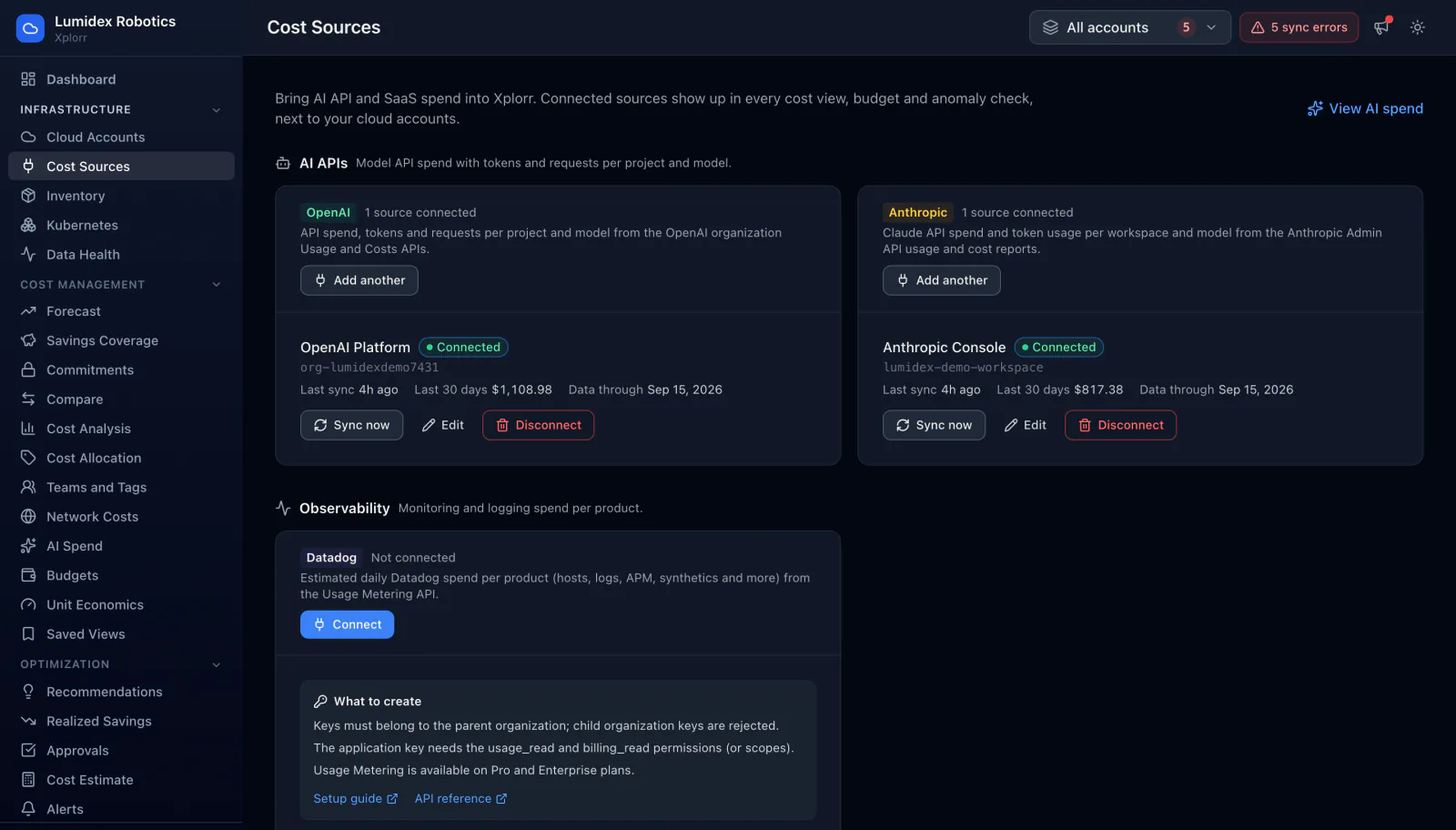
- Sources grouped into AI APIs and observability, with what each one brings in
- Connection status per source and how many sources of each type are connected
- The organization, workspace or account identifier behind each connection
- Spend over the last 30 days per connected source
- Last sync time and the date each source data runs through
- Sync now, edit and disconnect controls per source, and adding more than one of the same type
- The credential requirements and scopes a source needs before it will connect
Common questions about Cost Sources
Why connect AI spend here rather than track it separately?
What access does a source need?
Is Datadog spend the same as a Datadog invoice?
Can I connect more than one account per provider?
Background reading
Why Snowflake, Databricks and similar services end up billed outside your main cloud is part of AWS vs Azure vs GCP pricing in 2026.
For model spend on its own, see OpenAI and Anthropic cost tracking.
Related features
How this compares
See this on your own accounts
Connect a cloud account with read only credentials and the first sync pulls your last 30 days, so this screen fills with your numbers instead of the demo workspace. Free during beta.