Prove the saving happened instead of claiming it
Every cost tool will tell you what you could save. Realized Savings tells you what you did. When a recommendation is marked done, Xplorr measures the daily cost of that resource before and after the change in your actual bills, and reports the realized monthly saving beside the figure originally estimated.
Inputs
Where the Realized Savings numbers come from
Xplorr reads your accounts with read only credentials and never writes to your infrastructure. These are the sources behind this screen.
- The recommendation and its estimate
- Each savings event starts from a recommendation, carrying the monthly saving that was estimated for it and the date somebody marked it done. That estimate is what the measurement is later judged against.
- Daily cost for the affected resource
- The measurement reads the same daily billing data as the rest of Xplorr, scoped to the resource the recommendation concerned. The evidence is your invoice, not a model of what should have happened.
- The date the change was made
- Marking a recommendation done sets the boundary between the before window and the after window, which is what makes a before and after comparison possible at all.
Method
How the Realized Savings numbers are worked out
No black box. If a figure is an estimate or an apportionment rather than a billed line, the page says so.
Cost per day is compared either side of the change
The page records a before per day figure and an after per day figure for each completed recommendation. Using a daily rate rather than a monthly total avoids a change made mid month being measured against a partial month.
The realized figure is the measured difference
Realized monthly saving is derived from the gap between the before and after daily cost, not from the original estimate. This is the whole point: an estimate that turned out wrong stays visible as wrong.
Realization rate compares measured against estimated
Realization rate is realized saving over estimated saving. Above 100 percent means the change returned more than predicted, below means less, and tracking it is what tells you whether your estimates can be trusted next quarter.
A saving is measuring before it is confirmed
A change needs enough days of billing after it before the difference means anything, so an event sits in a measuring state first, then becomes confirmed or not realized. Not realized is kept rather than hidden, because a change that did not save anything is a finding too.
Open, in progress and done are counted apart
Projected savings from open recommendations are never mixed into realized savings. One is a forecast and one is a measurement, and adding them together is how savings numbers stop being believed.
In the console
What is on the Realized Savings screen
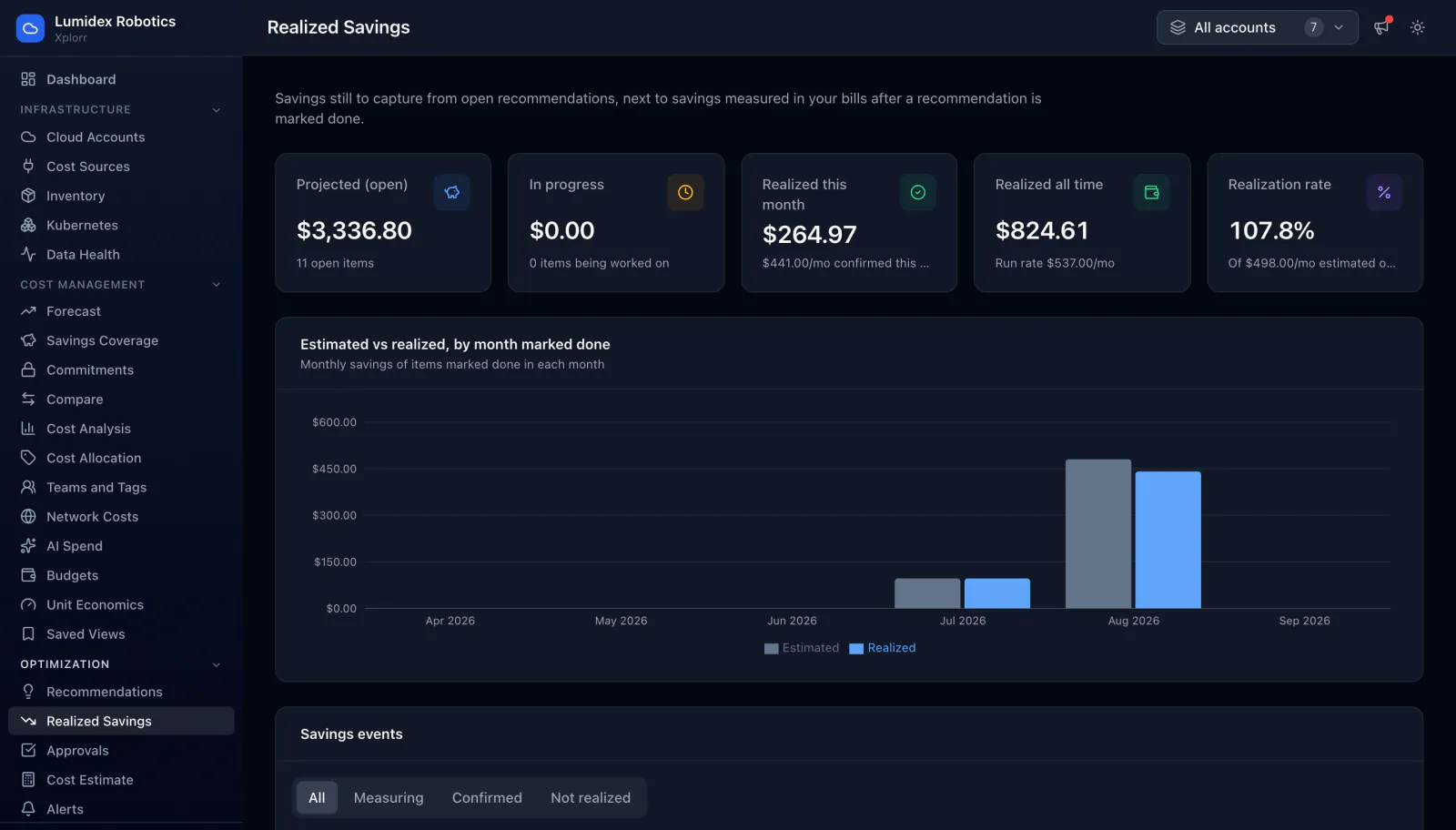
- Projected savings from open recommendations, with how many are open
- How many items are in progress, and what they are worth
- Realized savings this month and all time, with the confirmed monthly run rate
- Realization rate against the estimate that was originally made
- An estimated against realized chart grouped by the month each item was marked done
- A savings events table with the recommendation, date marked done and measurement method
- Estimated per month, before per day, after per day and realized per month for each event
- Filters for measuring, confirmed and not realized
Common questions about Realized Savings
How is a realized saving actually measured?
Why can the realization rate go above 100 percent?
What does not realized mean?
Why is there a delay before a saving is confirmed?
Background reading
A week of changes like the ones this page measures is laid out in How to cut your AWS bill in one week, with each step priced at published rates.
Related features
How this compares
See this on your own accounts
Connect a cloud account with read only credentials and the first sync pulls your last 30 days, so this screen fills with your numbers instead of the demo workspace. Free during beta.