Hand a recommendation to the tracker your team already uses
A saving only happens when somebody does the work, and the work gets scheduled in Jira or ServiceNow rather than in a cost tool. Xplorr creates an issue or a change request straight from a recommendation with the savings estimate and the resource attached, and sends signed JSON events to your own systems when a recommendation changes status or a new anomaly is raised.
Inputs
Where the Integrations numbers come from
Xplorr reads your accounts with read only credentials and never writes to your infrastructure. These are the sources behind this screen.
- Recommendations and their evidence
- A ticket is created from a recommendation, so the savings estimate and the specific resource travel with it. An issue that says reduce cloud cost is not actionable, and one naming the volume and the monthly figure is.
- Anomaly and budget events
- Webhook deliveries are driven by real events in Xplorr, a recommendation changing status, a ticket being created for one, or a new anomaly alert, rather than by polling on a timer.
- Your own endpoint and credentials
- Each integration holds the destination it talks to, a Jira site and project, a ServiceNow instance, or a webhook URL, along with the credentials that authorise it.
Method
How the Integrations numbers are worked out
No black box. If a figure is an estimate or an apportionment rather than a billed line, the page says so.
A recommendation becomes a ticket with its context intact
Creating a Jira issue carries the savings estimate and the resource into the description, and ServiceNow integration goes through the Table API to open an incident or a change request. The tracker keeps its own workflow, and Xplorr supplies the content.
Webhook payloads are signed
Events are sent as signed JSON, so the receiving system can verify a delivery genuinely came from Xplorr. An unsigned webhook endpoint is an open door for anyone who learns the URL.
Each integration subscribes to the events it wants
A destination selects which event types it receives, covering recommendation status changes, tickets being created and new anomalies. A pager should not receive every status change, and a finance channel should not receive none.
Integrations are testable and the result is recorded
Each one can be tested on demand, and the page keeps whether the last test passed or failed and how long ago. A webhook that broke three weeks ago is a silent failure otherwise, since nothing complains when a delivery simply stops arriving.
Disabling is separate from deleting
An integration can be turned off while keeping its configuration, which is what you want during an incident or a migration rather than rebuilding it from scratch afterwards.
In the console
What is on the Integrations screen
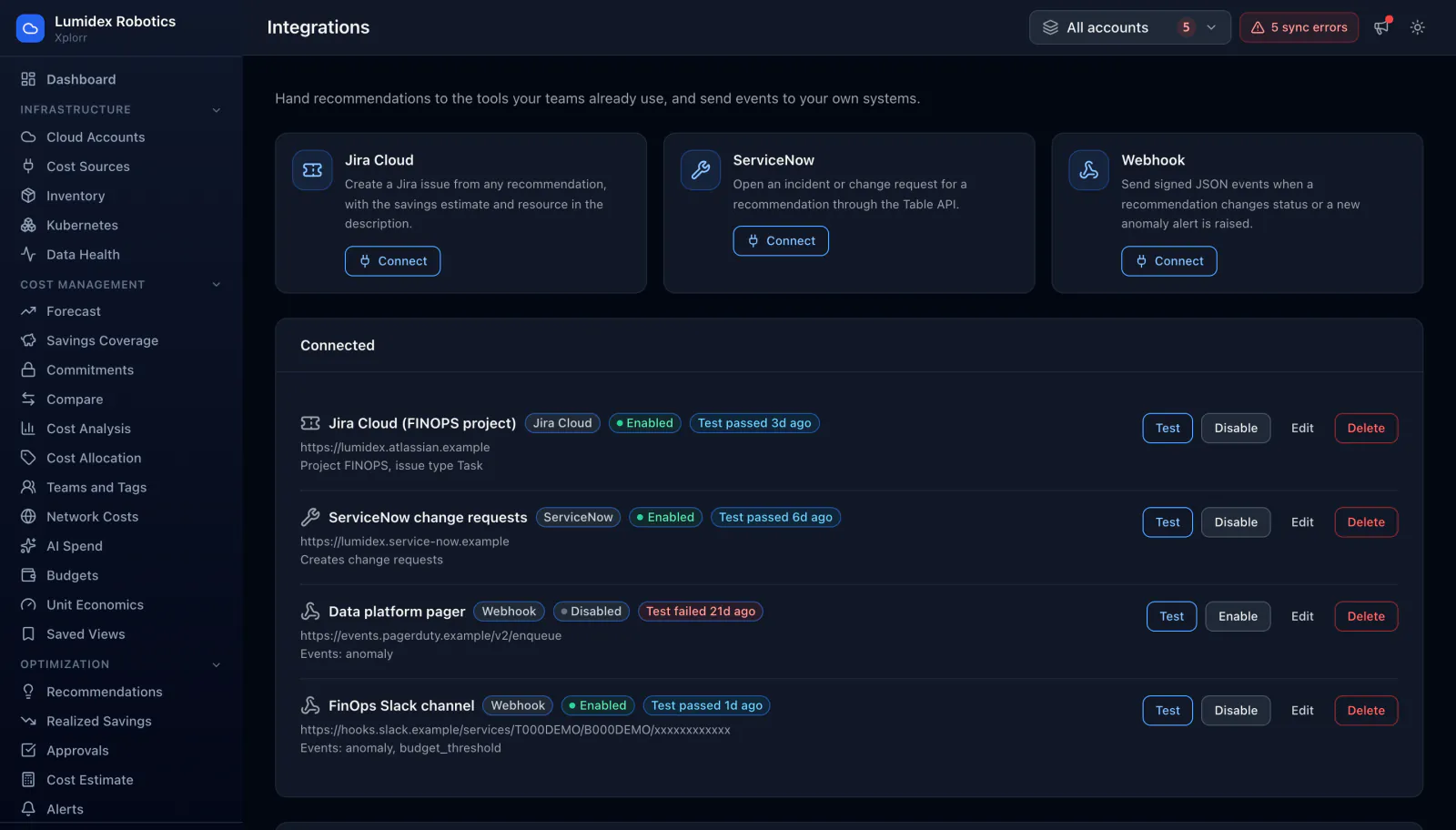
- Available connectors for Jira Cloud, ServiceNow and generic webhooks
- Every connected integration with its type and destination URL
- Whether each one is enabled or disabled
- The outcome of the last test and how long ago it ran
- Which event types each integration is subscribed to
- Test, enable or disable, edit and delete per integration
- Setup notes covering what each connector needs before it will work
Common questions about Integrations
What ends up in a Jira issue?
How does ServiceNow integration work?
Why are webhook events signed?
How do I know an integration is still working?
Background reading
Routing an alert to the person who can act on it, including through webhooks, is covered in the cloud cost monitoring and alerting guide.
Related features
How this compares
See this on your own accounts
Connect a cloud account with read only credentials and the first sync pulls your last 30 days, so this screen fills with your numbers instead of the demo workspace. Free during beta.