Know you are going over while you can still do something
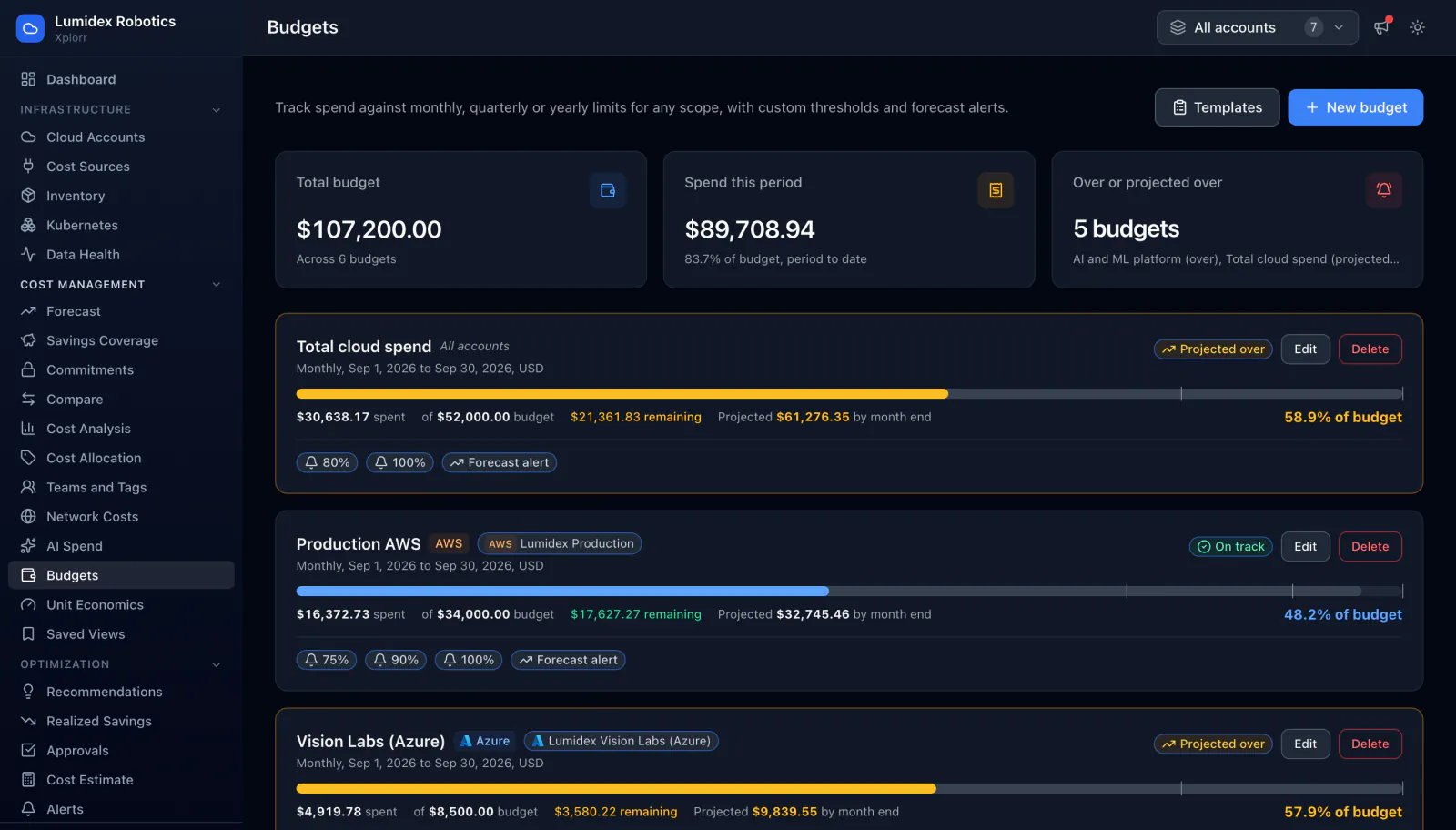
A budget that only tells you it was exceeded is a report, not a control. Xplorr tracks spend against each budget as the period runs and projects where it lands at month end, so a budget on pace to overshoot is marked as projected over days or weeks before it actually is.
Inputs
Where the Budgets numbers come from
Xplorr reads your accounts with read only credentials and never writes to your infrastructure. These are the sources behind this screen.
- Daily synced cost
- Spend to date comes from the billing data Xplorr syncs each day across AWS, Azure and GCP, so a budget reflects charges rather than an estimate of them.
- The scope you set
- A budget is bound to an account, a provider or the whole organisation, and only the cost inside that scope counts against it.
- Spend trajectory in the current period
- The rate spend is accumulating during the period, which is what the month end projection is built from.
Method
How the Budgets numbers are worked out
No black box. If a figure is an estimate or an apportionment rather than a billed line, the page says so.
Spend accumulates against the scope in real periods
Each budget tracks what has been spent so far in its period and what is left, rather than comparing a whole month after the fact.
A projection is run for period end
Current trajectory is carried forward to a month end figure. This is the number that turns a budget from a record into a warning, because it can exceed the limit while actual spend is still under it.
Over and projected over are different states
A budget already exceeded and a budget on pace to be exceeded are marked separately. Collapsing them would either cause false alarm or remove the early warning entirely.
Thresholds fire as the period runs
Alert thresholds are configured per budget and fire when crossed, so the notification arrives at the point of crossing rather than in a monthly summary.
Only complete days feed the projection
Billing data for today is partial, and a day only counts as complete once the provider has stopped revising it, which normally means anything up to yesterday. The projection takes the spend across the complete days of the period, divides it by that number of days and carries the rate to period end. On the first day of a period nothing is complete yet, so the projection is left blank rather than extrapolated from a few hours of data.
The projection is a flat daily rate, not a model
It assumes the rest of the period looks like the complete days so far. It does not know about a weekday and weekend pattern, a launch planned for the 20th, or an annual charge that lands mid period, so a budget over lumpy spend reads high or low until those days are behind it.
A tag scope only counts what the provider tagged
Scoping a budget to a tag matches the cost rows that carry that tag on the bill. Spend the provider never tagged, and charges that arrive with no resource level tags at all, fall outside the budget rather than into it. Scoping by account or by provider avoids that entirely.
In the console
What is on the Budgets screen
- Total budget across all budgets and total spent this period with its percentage
- A count of budgets over or projected over
- Progress bar per budget with the amount remaining
- Month end projection for each budget
- Alert thresholds configured per budget
- Scope per budget, whether an account, a provider or the organisation
Common questions about Budgets
Can a budget span more than one cloud?
What does projected over mean?
Where do budget alerts go?
How soon after creating a budget is it useful?
How often are thresholds checked?
Can budgets in different currencies be added up?
Background reading
Missing budget alerts is one of the 5 signs your cloud bill is about to spike, along with the other patterns a budget catches before the invoice does.
For a team spending grant money, the FinOps tool for startups page puts budgets next to credit run out alerts.
Related features
How this compares
See this on your own accounts
Connect a cloud account with read only credentials and the first sync pulls your last 30 days, so this screen fills with your numbers instead of the demo workspace. Free during beta.