Stop rebuilding the same filter every morning
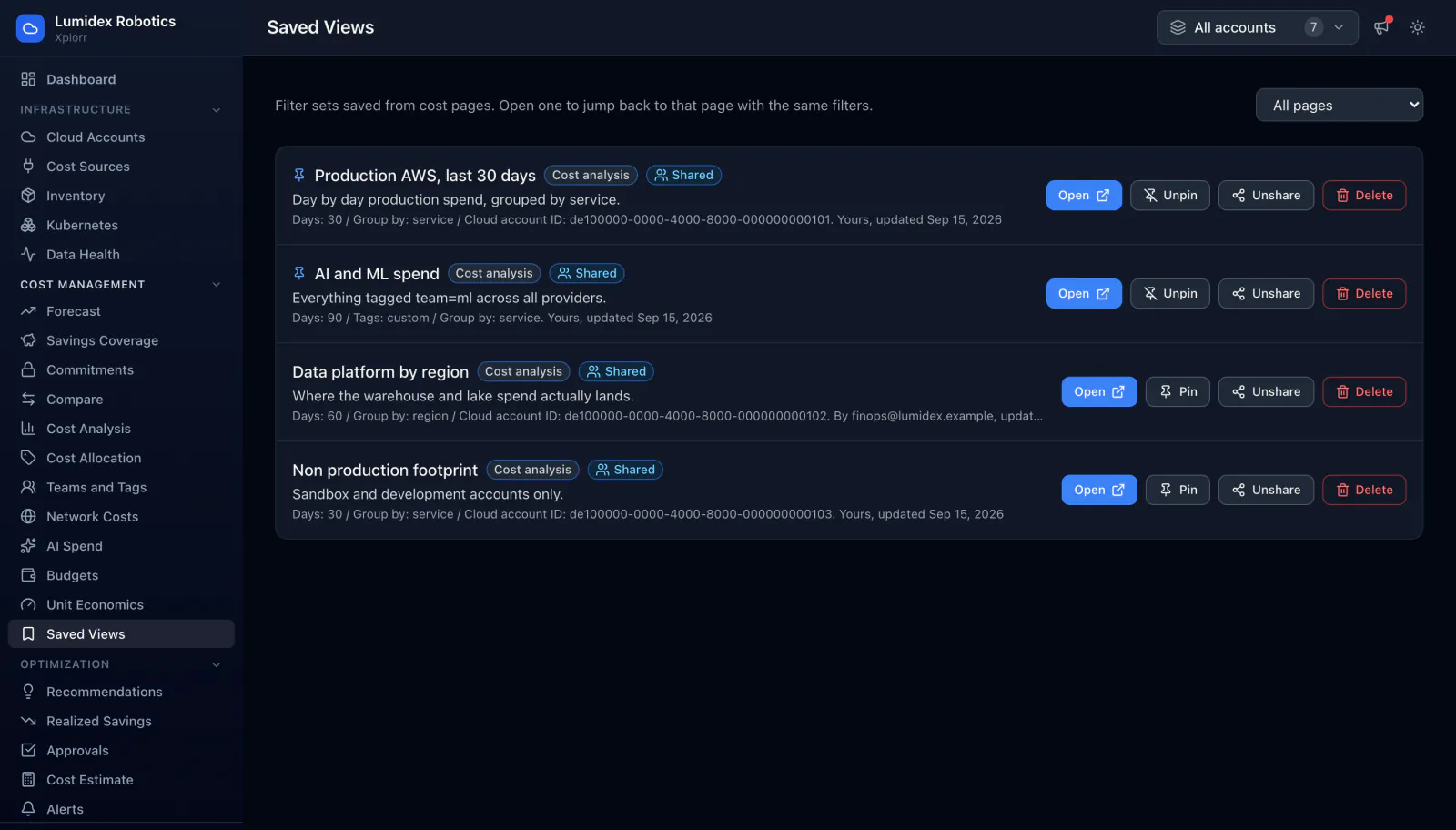
Most cost questions get asked again next week. A saved view captures the filter set behind a cost page, the date range, the grouping and the accounts in scope, and reopening it drops you back on that page with the same filters applied. Views can be pinned for quick access and shared so a colleague sees the numbers you meant.
Inputs
Where the Saved Views numbers come from
Xplorr reads your accounts with read only credentials and never writes to your infrastructure. These are the sources behind this screen.
- The filter state of the page you saved from
- A view stores what the page was actually showing: the day range, what it was grouped by, the cloud account or provider in scope, and any tag filter applied. Nothing about the cost data itself is copied.
- Live cost data at the time you open it
- Reopening a view reruns the query rather than replaying a snapshot, so a view saved last month shows the current numbers for that filter. This matters because providers restate recent days.
- Your organisation and role
- Views are scoped to your organisation, and a shared view is visible to your colleagues while an unshared one stays yours. The listing records who created each view and when it was last updated.
Method
How the Saved Views numbers are worked out
No black box. If a figure is an estimate or an apportionment rather than a billed line, the page says so.
Saving stores the query, not the result
Because the filter set is what is kept, a view stays useful as data arrives. A snapshot of a chart would be stale within a day, and would also disagree with the same page for anyone who opened it directly.
Each view remembers which page it came from
A view carries the page it was saved from, so opening it returns to that page rather than a generic report. The listing can be filtered by page, which keeps cost analysis views separate from the rest.
Pinning and sharing are separate decisions
Pinning is about how often you personally use a view. Sharing is about whether your team can see it. They are kept apart so pinning something for yourself does not push it at everyone else.
The parameters stay readable
Each saved view shows its own definition in plain terms, the day count, the grouping and the account, so you can tell two similar views apart without opening both.
In the console
What is on the Saved Views screen
- Every saved view with its name and description
- A badge for the page each view was saved from, and whether it is shared
- The stored parameters per view, including days, grouping and account
- Who created the view and when it was last updated
- Open, pin or unpin, share or unshare, and delete controls per view
- A filter to list views for one page instead of all of them
Common questions about Saved Views
Does a saved view freeze the numbers?
Who can see a view I share?
What is the difference between a saved view and a scheduled report?
Background reading
Dashboard design that people actually open, rather than one view for everyone, is covered in FinOps best practices for engineering teams.
Related features
How this compares
See this on your own accounts
Connect a cloud account with read only credentials and the first sync pulls your last 30 days, so this screen fills with your numbers instead of the demo workspace. Free during beta.