Know whether the numbers are complete before you act on them
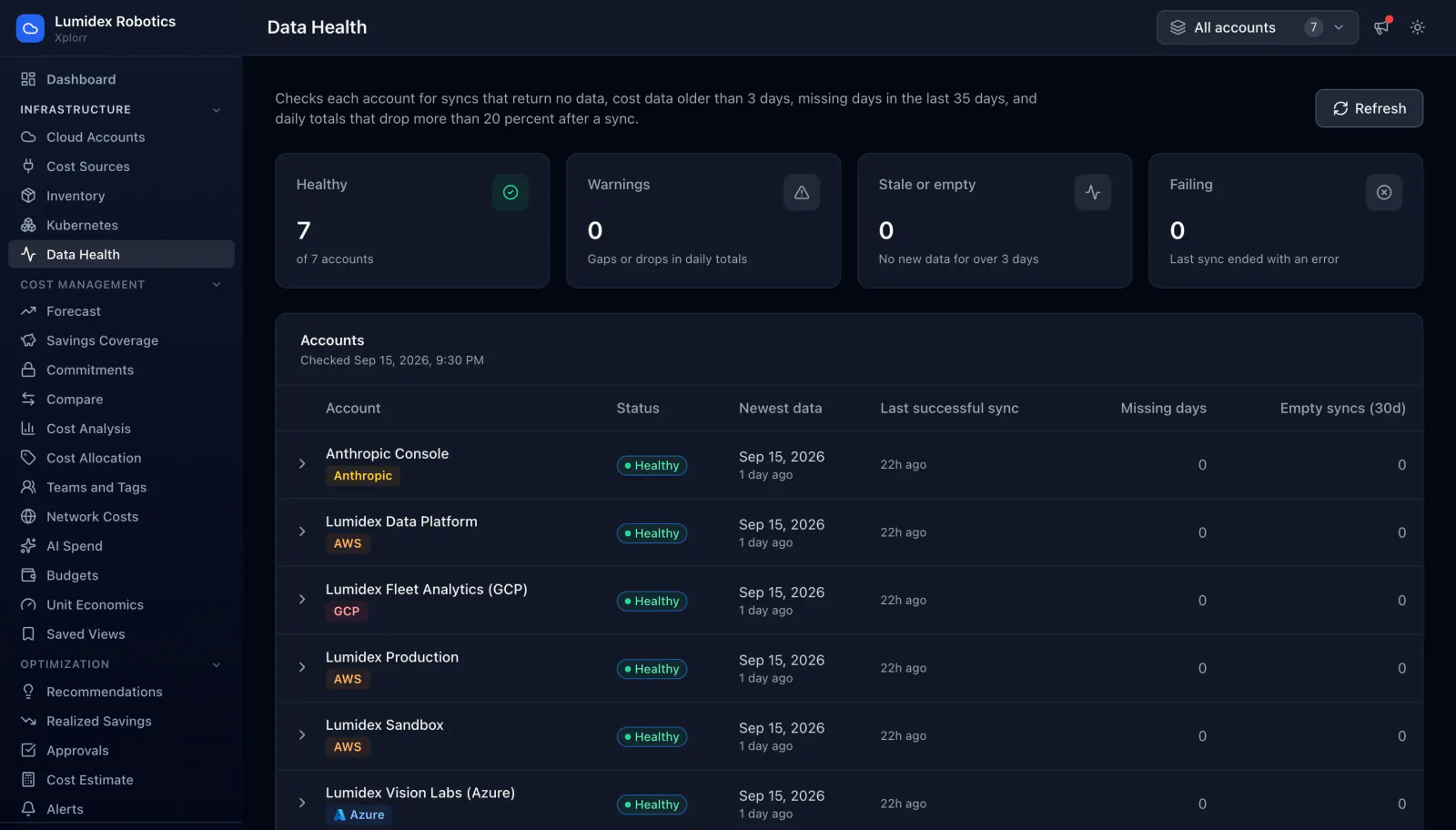
Every cost figure in Xplorr rests on a sync that either ran or did not. Data Health checks each connected account for syncs that returned no data, cost data older than three days, missing days in the last 35 days, and daily totals that dropped by more than 20 percent after a sync, and reports what it found per account.
Inputs
Where the Data Health numbers come from
Xplorr reads your accounts with read only credentials and never writes to your infrastructure. These are the sources behind this screen.
- Sync history per account
- Every sync Xplorr runs against a connected account is recorded with its outcome and how many rows it returned. A sync that completed but returned nothing is the signal this page exists to catch.
- The daily cost totals themselves
- The checks run against the stored daily totals rather than a separate health metric, so the thing being verified is the same data the cost pages read.
- Provider reporting lag
- AWS, Azure and GCP all publish billing data with a delay, and each one restates recent days. The checks are written around that behaviour rather than treating every late day as a fault.
Method
How the Data Health numbers are worked out
No black box. If a figure is an estimate or an apportionment rather than a billed line, the page says so.
Empty syncs are counted separately from failures
A sync that errors is obvious. A sync that succeeds and returns zero rows looks fine in a log and quietly leaves a hole in your cost history, so the page counts empty syncs over the last 30 days as their own column.
Freshness is measured against a three day threshold
An account whose newest cost data is more than three days old is marked stale or empty. Three days is chosen to sit outside normal provider reporting lag, so the flag means something is actually wrong rather than that the cloud is behind as usual.
Missing days are counted across a 35 day window
A 35 day window covers a full month plus the tail where providers are still restating figures. Any day inside it with no cost data for an account is counted as a missing day.
A daily total that falls after a sync raises a warning
Restatement is normal, but a day whose total drops by more than 20 percent after a later sync usually means a partial load rather than a genuine correction. Xplorr flags the drop instead of accepting the lower number in silence.
In the console
What is on the Data Health screen
- Counts of healthy, warning, stale or empty, and failing accounts
- The timestamp of the last health check across all accounts
- Newest cost data date and last successful sync time per account
- Missing days and empty syncs over 30 days as separate per account columns
- A status badge per account, expandable to the detail behind it
- A refresh control that reruns the checks on demand
Common questions about Data Health
Why does a cost tool need a data health page at all?
Is a missing day always a problem?
What counts as an empty sync?
Why flag a total that went down?
Background reading
The gaps this screen watches for come from the provider APIs themselves, and What building cloud cost integrations teaches you lists five of them.
Related features
How this compares
See this on your own accounts
Connect a cloud account with read only credentials and the first sync pulls your last 30 days, so this screen fills with your numbers instead of the demo workspace. Free during beta.