Put the model bill in the same view as the cloud bill
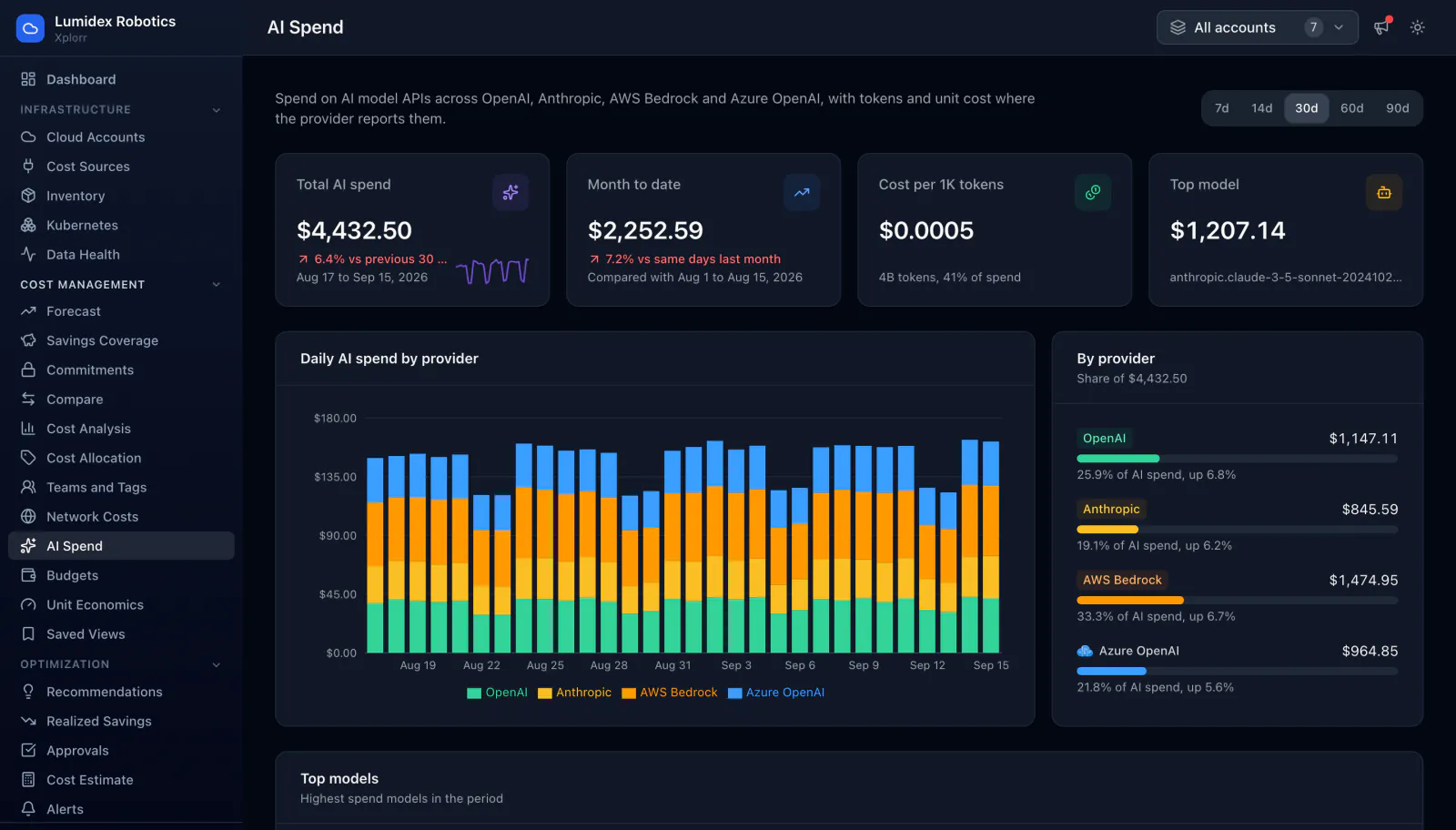
Model spend usually lives in a separate dashboard per provider, which is how it grows without anyone noticing. Xplorr treats OpenAI, Anthropic, AWS Bedrock and Azure OpenAI as cost sources like any other, so they appear in the same totals and charts as AWS, Azure and GCP, broken down by model.
Inputs
Where the AI Spend numbers come from
Xplorr reads your accounts with read only credentials and never writes to your infrastructure. These are the sources behind this screen.
- OpenAI and Anthropic
- Usage and cost are read from each provider directly, which is how spend that never touches your cloud bill still lands in the same total.
- AWS Bedrock and Azure OpenAI
- These are billed through the cloud accounts you have already connected, so they arrive through the existing AWS and Azure connections.
- Token counts where the provider reports them
- Token volumes come from the provider. Where a provider does not report them, cost is still tracked and the per token figures are simply absent rather than estimated.
Method
How the AI Spend numbers are worked out
No black box. If a figure is an estimate or an apportionment rather than a billed line, the page says so.
Model providers are treated as cost sources
Rather than a separate AI module, model spend enters the same cost pipeline as everything else. That is why it appears in the dashboard totals and the daily trend next to AWS, Azure and GCP instead of in its own silo.
Cost per thousand tokens is derived from your own usage
Spend divided by tokens actually consumed, which reflects the mix of models and context sizes you really run, not a headline rate from a pricing page.
Spend is attributed per model
Breaking cost down by model is what makes an expensive default visible, since the usual finding is that one model is quietly handling traffic a cheaper one could serve.
Tracked daily, like the rest of the bill
A daily series per provider means a change in model usage shows up as a dated step in a chart rather than as a surprise at the end of the month.
Cost per thousand tokens only covers the sources that report tokens
Token counts come from the OpenAI and Anthropic connectors, which return usage and cost as separate reports. Bedrock and Azure OpenAI arrive through the cloud bill, which carries cost but no token volume, so they are inside every cost figure on the page and outside the per token one. The denominator is the tokens Xplorr actually has, never an estimate of the rest.
Bedrock and Azure OpenAI are recognised from the billed service name
There is no separate Bedrock or Azure OpenAI connection to make. Xplorr picks those rows out of the AWS and Azure cost data it already syncs, matching Bedrock on the service name and Azure OpenAI on Foundry Models and on the Cognitive Services meters whose usage type names OpenAI. Model spend billed under a service name that does not match stays in the general cloud total instead of the AI one.
Both direct connectors need an organisation level admin key
OpenAI usage and cost are read from the organization Usage and Costs APIs, which only accept an Admin key created by an organization owner. Project keys are rejected by those endpoints. Anthropic works the same way through its Admin API, which is not available on individual accounts. Xplorr calls only the read endpoints on either provider.
In the console
What is on the AI Spend screen
- Total AI spend and month to date spend
- Cost per thousand tokens across total tokens consumed
- The top model by spend
- Daily spend charted by provider across OpenAI, Anthropic, AWS Bedrock and Azure OpenAI
- Breakdown by model
- The same figures folded into the dashboard total, rather than kept separate
Common questions about AI Spend
Why track model spend in a cloud cost tool?
Which providers are supported?
Why is cost per thousand tokens missing for a provider?
What shows up in the first days after connecting a model provider?
Is anything missing from the Anthropic figures?
How current are these numbers?
Background reading
The demo walkthrough in Inside the Xplorr demo workspace shows OpenAI and Anthropic stacked on the same daily cost chart as AWS, Azure and GCP, with seeded sample data.
If you are weighing Xplorr for model spend specifically, OpenAI and Anthropic cost tracking covers what each provider's admin key exposes and what it does not.
Related features
How this compares
See this on your own accounts
Connect a cloud account with read only credentials and the first sync pulls your last 30 days, so this screen fills with your numbers instead of the demo workspace. Free during beta.