AWS vs Azure vs GCP Pricing in 2026: Which Cloud Is Cheapest?
AWS vs Azure vs GCP pricing in 2026: which cloud is cheapest for compute, storage and egress at list price, with the regions and commitment rates behind each.

Xplorr team
The people who build Xplorr
In this post
- Which Cloud Is Cheapest for On-Demand VMs?
- How Much Do Commitments Change the Ranking?
- Which Cloud Is Cheapest for Object Storage?
- What Does Egress Actually Cost on Each Cloud?
- What Do Inter-Region and Cross-Provider Transfers Cost?
- Which Cloud Is Cheapest for Which Workload?
- Why Do Most Companies End Up Multi-Cloud Anyway?
- How Do You Track Spend Across All Three?
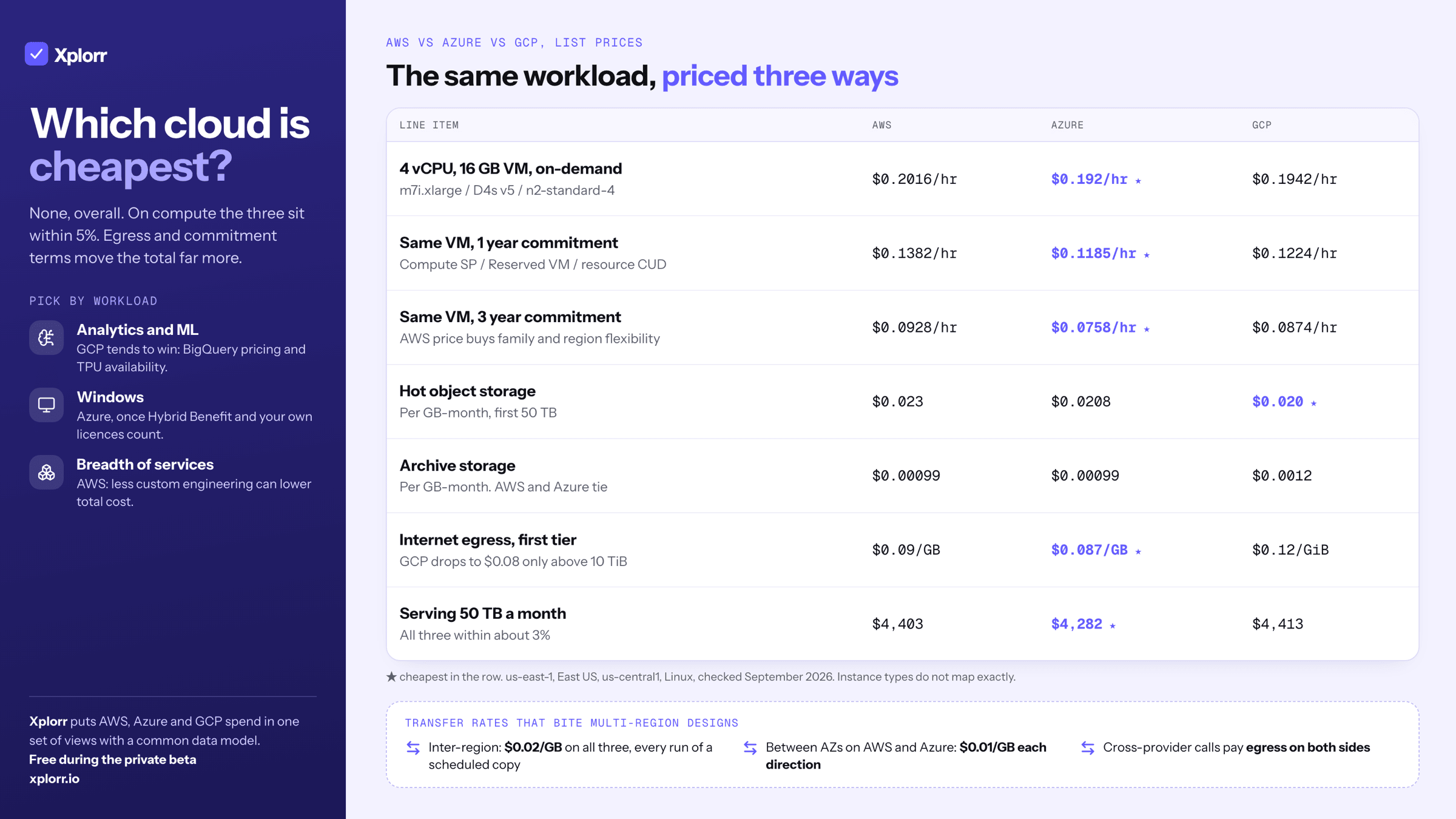
No single cloud is cheapest. At list price the three are within a few percent of each other on general-purpose compute, GCP is marginally cheapest on hot object storage, and AWS and Azure are cheapest on egress at low volume. Egress and commitment terms move the total far more than the headline compute rate does.
Everything below is priced in us-east-1, East US and us-central1 so the numbers are comparable. This post answers which provider is cheapest for each kind of workload. If the question is whether to run on more than one of them, the multi-cloud cost guide covers what a second cloud adds in overhead.
Which Cloud Is Cheapest for On-Demand VMs?
Instance types do not map perfectly across providers, so this compares the closest general-purpose 4 vCPU / 16 GB machine on each.
| Provider | Instance | Region | On-demand (Linux) |
|---|---|---|---|
| AWS | m7i.xlarge |
us-east-1 | $0.2016/hr |
| Azure | D4s v5 |
East US | $0.192/hr |
| GCP | n2-standard-4 |
us-central1 | $0.1942/hr |
Prices checked September 2026, us-east-1 / East US / us-central1.
The spread between cheapest and dearest is under 5%, which is inside the noise of instance-type mismatch. On-demand rate is not a reason to pick a provider. What you do next with commitments and what you move across the network are.
How Much Do Commitments Change the Ranking?
Committed pricing is where the three diverge, and where the comparison gets genuinely hard because each provider commits to a different thing.
| Provider | Commitment type | 1 year | 3 year |
|---|---|---|---|
| AWS | Compute Savings Plan, All Upfront | $0.1382/hr (31% off) | $0.0928/hr (54% off) |
| Azure | Reserved VM Instance | $0.1185/hr (38% off) | $0.0758/hr (61% off) |
| GCP | Resource-based committed use discount | $0.1224/hr (37% off) | $0.0874/hr (55% off) |
Prices checked September 2026, same instances and regions as the table above.
Read the rates rather than the discount percentages. Azure’s reservation is locked to a VM series in a region, and GCP’s resource CUD is locked to a machine family in a region, so both are closer to an AWS EC2 Instance Savings Plan than to the Compute Savings Plan priced here. AWS Compute Savings Plans buy flexibility (any family, any region, plus Lambda and Fargate) and charge for it in a shallower discount. GCP also applies sustained use discounts automatically, with no commitment at all, to instances that run most of the month.
Which Cloud Is Cheapest for Object Storage?
| Standard / hot tier | Price per GB-month |
|---|---|
| AWS S3 Standard, first 50 TB | $0.023 |
| Azure Blob Hot LRS, first 50 TB | $0.0208 |
| GCP Cloud Storage Standard | $0.020 |
| Archive tier | Price per GB-month |
|---|---|
| AWS S3 Glacier Deep Archive | $0.00099 |
| Azure Archive LRS | $0.00099 |
| GCP Archive | $0.0012 |
Prices checked September 2026, us-east-1 / East US / us-central1, LRS where a redundancy option applies.
GCP is cheapest on the hot tier and dearest on archive. On 100 TB of hot storage the gap between GCP and AWS is $300 a month, which is real but small next to what the same 100 TB costs to move. Storage unit price is rarely the dominant driver. Retrieval operations and egress are.
For managed database storage the picture diverges sharply by engine and configuration. PostgreSQL on RDS, Azure Database and Cloud SQL can differ by 2x to 3x for the same workload depending on instance sizing and multi-AZ setup, so price those against your own configuration rather than a table.
What Does Egress Actually Cost on Each Cloud?
All three charge for data leaving their network, and the rates are high enough to change architecture decisions.
| Provider | Internet egress tiers |
|---|---|
| AWS | $0.09/GB first 10 TB, $0.085/GB next 40 TB (first 100 GB/month free) |
| Azure | $0.087/GB to 10 TB, $0.083/GB above (first 100 GB/month free) |
| GCP Premium Tier, to North America | $0.12/GiB from 1 GiB to 1 TiB, $0.11/GiB to 10 TiB, $0.08/GiB above |
Prices checked September 2026, us-east-1 / East US / us-central1.
GCP’s headline $0.08 rate only applies above 10 TiB. Below that it is the most expensive of the three, not the cheapest, and that ordering flips for anyone shipping less than roughly 10 TB a month.
Serve 50 TB a month and the three land within about 3% of each other: $4,403 on AWS, $4,282 on Azure, $4,413 on GCP. Egress is not a reason to switch provider. It is a reason to put a CDN in front of whatever you already run. To see what you pay for it today, Xplorr’s network costs view separates egress and transfer from compute on each provider.
What Do Inter-Region and Cross-Provider Transfers Cost?
| Transfer type | Rate |
|---|---|
| AWS, us-east-1 to any other AWS region | $0.02/GB |
| AWS, between AZs in one region | $0.01/GB each direction |
| Azure, standard inter-region | $0.02/GB |
| Azure, between availability zones | $0.01/GB each direction |
| GCP, inter-region within North America | $0.02/GB |
Prices checked September 2026, us-east-1 / East US / us-central1.
This is the rate that bites multi-region architectures, because nobody models it at design time. A cross-region replication path that copies the same dataset on a schedule pays $0.02/GB every single run.
Cross-provider traffic is worse: each provider charges its own internet egress rate, so a microservice on AWS calling an API on GCP pays on both sides. That is the financial weight behind vendor lock-in arguments, separate from the philosophical ones.
Which Cloud Is Cheapest for Which Workload?
Genuinely workload-dependent, but some patterns hold.
Data analytics and ML. GCP tends to win. BigQuery’s pricing model (per query on demand, or a flat-rate reservation) and TPU availability make it cost-effective for data-heavy work, and Vertex AI prices competitively against SageMaker.
Windows workloads. Azure. Microsoft’s licensing position means Azure VMs running Windows usually come out ahead once Azure Hybrid Benefit and bring-your-own-license options are counted.
Breadth-of-service workloads. AWS’s range of managed services means less custom engineering, which often lowers total cost of ownership even where unit compute prices are not the lowest.
Kubernetes. Closer than it looks. The EKS control plane is $0.10/hr per cluster, the AKS control plane is free on the standard tier, and GKE Autopilot prices per pod resource request. Which is cheapest depends entirely on how many clusters you run and how well your pod requests match actual usage.
Why Do Most Companies End Up Multi-Cloud Anyway?
In theory, one provider should be cheaper: better negotiated discounts, deeper team expertise, no cross-provider egress. In practice, most companies above a certain size end up multi-cloud for reasons that have nothing to do with price:
- Acquisitions. A company you acquire already runs on Azure
- Data residency. Customer contracts require data in regions your primary provider does not cover
- Best-of-breed services. Snowflake, Databricks and Confluent run on several clouds and bill separately from your primary provider
- Disaster recovery. A second cloud as a warm DR target
- Team history. An ML team defaults to GCP while the infrastructure team runs AWS
The practical consequence is that “which cloud is cheapest” matters less than “how do we see across the clouds we are already on”.
How Do You Track Spend Across All Three?
Once you are on more than one provider, the comparison question turns into a monitoring and attribution question: total spend in one place, allocated by team or product, with anomalies caught across all three.
Three separate tools do not answer it, which is why Xplorr’s cost analysis puts all three in one set of views. Unified billing visibility with a common data model does, so that “compute spend” means the same thing whether it is EC2, Azure VMs or GCP Compute Engine.
That is what Xplorr is built for. It connects to AWS, Azure, and GCP and normalizes billing data from all three so you can make one coherent decision about where the money goes. Explore Xplorr’s features, or check pricing. There is a Free plan for 1 cloud account, no credit card required.
Xplorr shows your AWS, Azure and GCP spend in one place, with anomaly detection, budgets and rightsizing recommendations. Get started free.
Keep reading
- Multi-Cloud Cost: When a Second Cloud Helps and When It Hurts
- Why Multi-Cloud Cost Visibility Is Broken
- Azure Cost Optimization: A Practical Guide
See how Xplorr helps → Features
Written by
Xplorr team
The people who build Xplorr
Written together by the engineers who build Xplorr: the AWS, Azure, GCP and Kubernetes collectors, the console, and the alerting behind them.
About Xplorr