Multi-Cloud Cost: When a Second Cloud Helps and When It Hurts
Is multi-cloud more expensive? What a second cloud adds in split commitments, egress and duplicate tooling, with a decision framework and a worked example.

Xplorr team
The people who build Xplorr
In this post
- What does the same VM cost on AWS, Azure and GCP?
- Spot pricing no longer favours GCP
- Which provider is cheapest for object storage?
- Which provider is cheapest for block storage?
- What does egress cost on each provider?
- What does a managed PostgreSQL cost on each provider?
- Why does multi-cloud usually cost more?
- Split commitments lose discount tiers
- You run two of everything
- Data gravity pulls everything to one side
- When is multi-cloud worth it?
- Best-of-breed services
- Vendor negotiation leverage
- Geographic and regulatory requirements
- How should you decide?
- Start single-cloud
- Add a second cloud only for a quantified reason
- Minimize the seams
- Worked example: single-cloud vs multi-cloud
- What should you do at your scale?
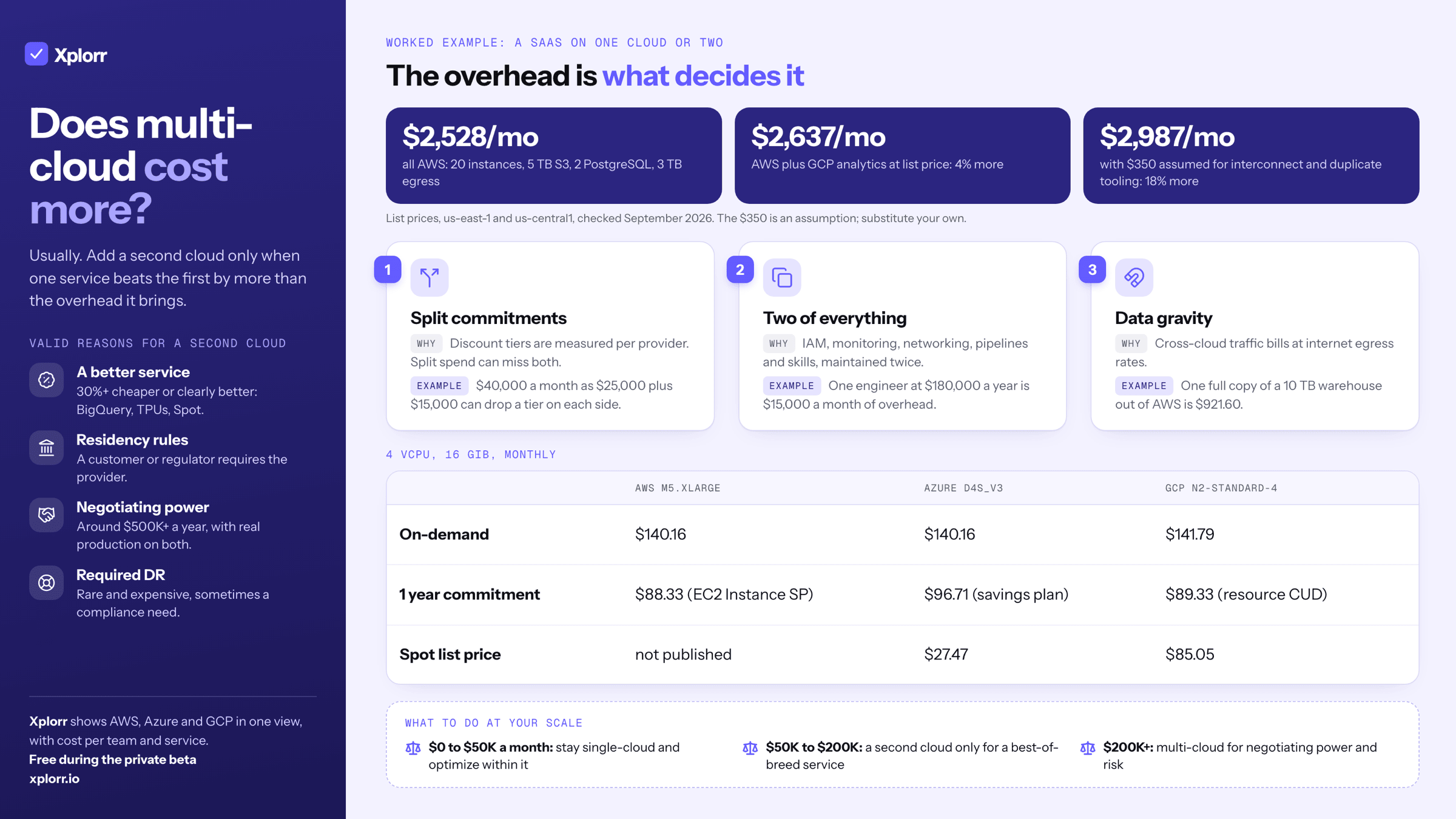
On-demand compute is within 1% across AWS, Azure and GCP, so the differences that matter are egress, block storage and managed databases. Multi-cloud usually raises total cost: split commitments lose discount tiers, cross-cloud traffic bills at internet egress rates, and you run two of every tool. Add a second cloud only when a specific service beats the first by more than that overhead.
“We’re multi-cloud” can mean a deliberate placement strategy, or it can mean one team chose AWS, another chose GCP, and nobody coordinated. The numbers below are list prices as of September 2026, in us-east-1, East US and us-central1, so you can run the comparison for your own workload rather than argue it. For a straight answer to which single provider is cheapest per service, see AWS vs Azure vs GCP pricing in 2026; this guide is about what running more than one of them costs.
What does the same VM cost on AWS, Azure and GCP?
Comparing cloud pricing is harder than it should be because each provider names things differently and prices on slightly different axes. Normalizing to 4 vCPUs and 16 GiB of general purpose compute:
| AWS (m5.xlarge) | Azure (D4s_v3) | GCP (n2-standard-4) | |
|---|---|---|---|
| On-demand hourly | $0.192 | $0.192 | $0.1942 |
| Monthly (730 hrs) | $140.16 | $140.16 | $141.79 |
| 1-year commitment | $88.33 (EC2 Instance SP, no upfront) | $96.71 (savings plan) | $89.33 (resource CUD) |
| 3-year commitment | $60.59 (EC2 Instance SP, no upfront) | $65.88 (savings plan) | $63.81 (resource CUD) |
| Spot list, monthly | not published | $27.47 | $85.05 |
Prices checked September 2026: us-east-1, East US and us-central1, Linux. AWS does not publish a Spot list price; Azure and GCP do, and both float.
On-demand has converged. Within 1% across all three. If you are comparing purely on on-demand compute, there is nothing to find.
AWS is cheapest on commitment, but only just. The 1-year spread is $88.33 to $96.71, about 9%. Azure is the outlier here because D4s_v3 reserved instances were discontinued for new purchase on 1 July 2026, so the savings plan is the only option on that SKU. A current-generation Azure SKU with a reservation closes most of the gap.
GCP still gives you a discount for free. Sustained Use Discounts apply automatically to N1, N2, N2D and C2 with no commitment, up to 30% on N1 and 20% on N2. Neither AWS nor Azure has an equivalent. E2, C3, C4 and N4 get nothing, so it is not universal.
Spot pricing no longer favours GCP
This is the reversal most comparisons have not caught. Azure’s list Spot rate for a D4s_v3 in East US is currently about 80% below pay-as-you-go. GCP’s Spot rate for an n2-standard-4 in us-central1 is about 40% below on-demand, despite Google publishing “up to 91%” as a headline. On these SKUs Azure Spot is roughly three times cheaper than GCP Spot.
Two caveats. Spot rates are recalculated frequently on both providers, so price your own SKU in your own region before committing to an architecture. And the old GCP constraint people still cite is gone: Spot VMs have no maximum runtime. It was the legacy Preemptible VMs that were terminated after 24 hours.
Which provider is cheapest for object storage?
| AWS S3 Standard | Azure Blob Hot | GCP Cloud Storage Standard | |
|---|---|---|---|
| Storage per GB/month (first 50 TB) | $0.023 | $0.0208 | $0.020 |
| GET per 1,000 requests | $0.0004 | $0.0004 | $0.0004 |
| PUT per 1,000 requests | $0.005 | $0.005 | $0.005 |
| Data retrieval per GB | Free | Free | Free |
Prices checked September 2026: us-east-1, East US (LRS), us-central1. Operation pricing is identical across all three.
GCP is marginally cheapest and the spread is narrow. At 100 TB, allowing for each provider’s volume tiers, the monthly bill is $2,304 on S3, $2,087 on Azure Blob Hot and $2,048 on GCS. Over a year that is a $3,072 gap between the most and least expensive, which is real but small next to what the same 100 TB costs to move.
Which provider is cheapest for block storage?
Here the spread is much wider than for objects.
| AWS EBS gp3 | Azure Premium SSD P30 | GCP pd-ssd | |
|---|---|---|---|
| Storage per GB/month | $0.08 | $0.132 ($135.17 for 1 TiB) | $0.17 |
| Baseline IOPS | 3,000 (free) | 5,000 (included) | Scales with size |
| Baseline throughput | 125 MiB/s (free) | 200 MB/s (included) | Scales with size |
Prices checked September 2026: us-east-1, East US (LRS), us-central1.
EBS gp3 is the cheapest per GB and has the most flexible performance tuning: you set IOPS and throughput independently of disk size. GCP pd-ssd is more than twice the price per GB. Worth knowing before you use it as the default: GCP’s Hyperdisk Balanced is $0.08/GB-month, matching gp3, but it bills IOPS and throughput separately above a 3,000 IOPS and 140 MBps baseline, so the headline comparison overstates the saving.
What does egress cost on each provider?
Data transfer out of the cloud is where providers make money, and it is the cost that surprises teams going multi-cloud the most. Xplorr’s network costs view pulls egress, NAT and cross region transfer out of each bill, which is the number to check before adding a second cloud.
| Transfer type | AWS | Azure | GCP (Premium Tier, to North America) |
|---|---|---|---|
| To internet, low tier | $0.09/GB (first 10 TB) | $0.087/GB (100 GB to 10 TB) | $0.12/GB (1 GiB to 1 TiB) |
| To internet, next tier | $0.085/GB (next 40 TB) | $0.083/GB (10 to 50 TB) | $0.11/GB (1 to 10 TiB) |
| To internet, high volume | $0.05/GB (over 150 TB) | $0.05/GB (over 150 TB) | $0.08/GB (over 10 TiB) |
| Same provider, different region | $0.02/GB | $0.02/GB | $0.02/GB |
| Between availability zones | $0.01/GB | $0.01/GB | $0.01/GB |
Prices checked September 2026. GCP no longer uses a 10 TB / 40 TB tier structure; it prices by destination continent with breaks at 1 GiB, 1 TiB and 10 TiB, and the rates shown are Premium Tier to North America. Azure’s first 100 GB per month is free.
Cross-cloud transfer is billed as internet egress. If your API runs on AWS and your analytics on GCP, every byte between them pays the internet rate. A pipeline moving 5 TB a month between clouds costs $445 to $563 depending on which side originates it.
That is the single biggest hidden cost of multi-cloud. It doesn’t show up in a per-VM comparison. It shows up three months later when someone asks why the network line item tripled.
What does a managed PostgreSQL cost on each provider?
Matched at 4 vCPU and 16 GiB:
| AWS RDS (db.m5.xlarge) | Azure Flexible Server (GP, D4s_v3) | GCP Cloud SQL (db-custom-4-16384) | |
|---|---|---|---|
| On-demand hourly | $0.356 | $0.342 | $0.2772 |
| Monthly (730 hrs) | $259.88 | $249.66 | $202.36 |
| 1-year commitment, monthly | $166.44 (RI, no upfront) | $149.67 (reserved) | $151.77 (CUD) |
| Storage per GB/month (SSD) | $0.115 (gp3) | $0.115 | $0.17 |
| Backup storage | Free up to DB size | $0.095/GB-month beyond allocation | $0.08/GB-month |
| Multi-AZ / HA | 2x price | Zone-redundant standby, priced separately | 2x price (regional) |
Prices checked September 2026: us-east-1, East US, us-central1, PostgreSQL, single-zone unless stated. Azure Database for PostgreSQL Single Server, and its GP_Gen5_x SKU naming, was retired in March 2025; these are Flexible Server prices.
GCP Cloud SQL is cheapest for the base instance and most expensive for storage, at $0.17/GB against $0.115. For a database-heavy workload the storage difference compounds: a 2 TB instance pays about $114 a month more on GCP than on AWS or Azure, which erases the compute advantage.
Why does multi-cloud usually cost more?
Most teams that go multi-cloud see total cost rise. Three mechanisms do most of it, and none of them appears on a pricing page.
Split commitments lose discount tiers
Cloud provider discounts are volume-based and the tiers are not linear, which is what makes the split expensive. Take $40,000/month of spend. Concentrated on one provider it qualifies for a tier the same money does not reach when divided, because the qualifying threshold is measured per provider.
Splitting to $25,000 and $15,000 can drop you a tier on the larger half and leave the smaller half below the entry threshold entirely. The workloads did not change and neither did the list prices; only the discount rates applied to them did. Model this before the migration using the actual tier thresholds in your agreement. It is the one cost of multi-cloud that lands immediately and is invisible in any architecture diagram.
You run two of everything
Running on two clouds means two sets of IAM policies and permission models to audit, two monitoring stacks or a third-party tool covering both, two networking configurations with a link between them, two deployment pipelines, and engineers who know both platforms or two teams of specialists.
None of that shows up on a cloud bill, which is why it is usually left out of the comparison. Put your own number on it: count the items your org genuinely maintains twice, estimate the engineer-time each consumes, and multiply by a fully loaded salary. A single full-time-equivalent engineer at $180,000/year is $15,000/month of overhead that no pricing page will show you, and that is the figure a per-VM price difference has to beat.
Data gravity pulls everything to one side
Once your data lives in one cloud, everything that touches it wants to be in the same cloud. Processing data somewhere else means either paying to transfer it, duplicating it, or accepting the latency.
A 10 TB warehouse on AWS costs $921.60 in egress for a single full copy out to another cloud at $0.09/GB. If a job re-reads the whole thing daily rather than reading incrementally, that is thirty times the number. Replicating instead of transferring swaps the egress bill for a second storage bill plus sync complexity.
When is multi-cloud worth it?
Despite the overhead, there are real cases.
Best-of-breed services
| Workload | Best provider | Why |
|---|---|---|
| Large-scale analytics | GCP (BigQuery) | Serverless, per-query pricing, no cluster management |
| ML training | GCP (TPUs) or Azure (AMD MI300X) | Specialized hardware not available elsewhere |
| Enterprise SaaS integration | Azure | Entra ID integration, Microsoft ecosystem |
| Broadest service catalog | AWS | Most services, most regions, most mature |
| Cheap interruptible compute | Azure (Spot) | Currently ~80% off on D-series, ahead of GCP Spot |
The test is arithmetic, not preference. The second cloud has to beat the first on the specific workload by more than the egress and tooling overhead it adds. If BigQuery’s per-query pricing beats a Redshift cluster for your query pattern by more than the cost of moving the data and running a second set of pipelines, the split pays. If it does not, you have bought complexity.
Vendor negotiation leverage
Having production workloads on two clouds gives you real negotiating power, and the arithmetic is worth doing before you dismiss it. At $600,000/year of AWS spend, each additional percentage point of enterprise discount is $6,000/year. A seven point improvement is $42,000/year, which at that scale can cover the operational overhead of the second cloud several times over.
Below a few hundred thousand a year it will not, because the overhead is roughly fixed while the discount scales with spend. It also only works if the presence is real. A few dev instances on GCP give you no leverage. A meaningful share of production does, because the threat to move the rest is credible.
Geographic and regulatory requirements
Some markets require data residency in regions where not every provider has presence. Azure has the broadest government and sovereign cloud coverage, AWS has the most total regions, and GCP has fewer regions but competitive pricing in APAC. If you must serve customers where your primary cloud has no data center, a second cloud can be cheaper than working around it.
How should you decide?
Start single-cloud
Unless you have a specific, quantified reason to use multiple clouds, start with one. Engineers learn one platform deeply rather than two superficially, all spend counts toward volume discounts and commitment tiers, you maintain one set of tooling and one IAM model, and there are no egress costs between your own services.
For most startups and mid-size companies AWS is the default: largest ecosystem, most third-party tool support, most candidates who already know it. GCP if your workload is heavily data and analytics oriented. Azure if you are enterprise-heavy and need Microsoft ecosystem integration.
Add a second cloud only for a quantified reason
Valid reasons:
- A specific service is 30%+ cheaper or significantly better on another provider (BigQuery, TPUs, Spot capacity)
- Customer or regulatory requirement mandates residency on a specific provider
- Negotiation leverage at scale ($500K+ annual spend) where the savings outweigh the overhead
- Cross-provider disaster recovery, rare and expensive but sometimes required by compliance
Invalid reasons teams often use:
- “Avoiding vendor lock-in”: a theoretical risk that costs real money to mitigate. Most lock-in is in proprietary services, not VMs and containers.
- “Cloud-agnostic architecture”: abstracting away cloud differences means you can’t use the best features of any cloud. Lowest common denominator at the highest cost.
- “Our CTO read an analyst report”: strategy should follow analysis.
Minimize the seams
The most expensive part of multi-cloud is the boundary. Keep data and compute together, so whatever processes your data sits where the data lives. Use cloud-native interconnect (Direct Connect, ExpressRoute, Cloud Interconnect) rather than public internet for cross-cloud traffic, because it is cheaper per GB and lower latency. Give each cloud a clear owning team rather than expecting every engineer to be proficient in both. And centralize cost visibility, because the native tools only ever show their own cloud.
Worked example: single-cloud vs multi-cloud
A SaaS company running 20 compute instances, 5 TB object storage, 2 managed PostgreSQL databases and 3 TB/month egress.
Single-cloud, all AWS:
| Component | Monthly |
|---|---|
| 20x m5.xlarge (1-yr EC2 Instance SP) | $1,767 |
| 5 TB S3 Standard | $118 |
| 2x db.m5.xlarge RDS (1-yr RI) | $333 |
| 500 GB EBS gp3 | $40 |
| 3,000 GB egress to internet | $270 |
| Total | $2,528 |
Multi-cloud, AWS primary plus GCP analytics:
| Component | Monthly |
|---|---|
| 14x m5.xlarge AWS (1-yr EC2 Instance SP) | $1,237 |
| 6x n2-standard-4 GCP (1-yr resource CUD) | $536 |
| 3 TB S3 + 2 TB GCS | $112 |
| 2x db.m5.xlarge RDS (1-yr RI) | $333 |
| 500 GB EBS gp3 + 200 GB pd-ssd | $74 |
| 2,000 GB AWS egress to internet | $180 |
| 1,000 GB GCP egress to internet | $120 |
| 500 GB cross-cloud transfer | $45 |
| List-price subtotal | $2,637 |
| Cross-cloud interconnect and duplicate tooling | your figure, $350 assumed |
| Total | $2,987 |
Prices checked September 2026, us-east-1 and us-central1. Every line above the subtotal is a published list price. The interconnect and tooling line is not: substitute your own.
On list prices alone, the multi-cloud version costs $109/month more, about 4%. That is close enough that a per-VM price argument could go either way. Including the interconnect and duplicate tooling it is $459/month more, about 18%, and that gap is what makes the decision.
The arithmetic only flips when the second cloud runs a genuinely cheaper service. If those 6 GCP instances were replaced by BigQuery processing at $300/month, the total drops to $2,751, still $223 above single-cloud, but now you are buying a capability AWS does not offer rather than paying a premium for the same compute.
What should you do at your scale?
Multi-cloud is neither a best practice nor an anti-pattern. It is an architectural decision with tradeoffs that change with size.
$0 to $50K/month. Stay single-cloud. The operational overhead will exceed any savings. Optimize within your chosen provider instead.
$50K to $200K/month. Consider a second cloud only for a specific best-of-breed service where the capability gap is significant: BigQuery for analytics, Azure for enterprise identity, Azure Spot for large interruptible fleets.
$200K+/month. Multi-cloud becomes legitimate for negotiation leverage and risk management. The operational overhead is a smaller share of total spend and the negotiation savings can be substantial.
The mistake most teams make is treating this as binary. In practice the right answer is usually “single-cloud with specific exceptions”: run the large majority of your infrastructure on one provider and use a second only where it clearly wins.
If you’re trying to work out your actual cost distribution across clouds, Xplorr gives you a unified view across AWS, Azure and GCP with cost attribution per team and service. But the framework above works regardless of tooling. Start with the numbers, not the strategy.
Keep reading
- Why Multi-Cloud Cost Visibility Is Broken
- AWS vs Azure vs GCP Pricing in 2026: Which Cloud Is Cheapest?
- Hidden Cloud Costs You’re Probably Missing Right Now
See how Xplorr helps → Features
Xplorr shows your AWS, Azure and GCP spend in one place, with anomaly detection, budgets and rightsizing recommendations. Get started free.
Written by
Xplorr team
The people who build Xplorr
Written together by the engineers who build Xplorr: the AWS, Azure, GCP and Kubernetes collectors, the console, and the alerting behind them.
About Xplorr