Cloud Cost Optimization for Startups: A Practical Guide by Stage
Cloud cost optimization for startups from pre-seed to Series B: budget controls, right-sizing and a cost-saving roadmap priced at AWS list rates.

Xplorr team
The people who build Xplorr
In this post
- What Do Almost All Startups Over-Provision?
- What Does Running Staging 24/7 Cost?
- Is the AWS Free Tier Still Worth Using?
- Why Do Billing Alerts Matter Most Early?
- Pre-Seed: How Much Should Cloud Cost?
- Pre-Seed: What Should You Not Optimize?
- Post-Seed: How Should You Set Up Budgets?
- Post-Seed: How Much Does Scheduling Non-Prod Save?
- Post-Seed: How Do You Right-Size a Database?
- Post-Seed: Should CI Run on Spot?
- Post-Series A: Who Owns Cost?
- Post-Series A: Which Tags Do You Need?
- Post-Series A: When Should You Buy Savings Plans?
- Post-Series A: What Does the First Cost Audit Find?
- Post-Series B: Do You Need a FinOps Hire?
- Post-Series B: Why Unit Economics Beat Total Spend?
- Post-Series B: How Do You Build a Reservation Strategy?
- What Does the Cost-Saving Roadmap Look Like?
- Worked Example: What Does a Non-Production Environment Cost?
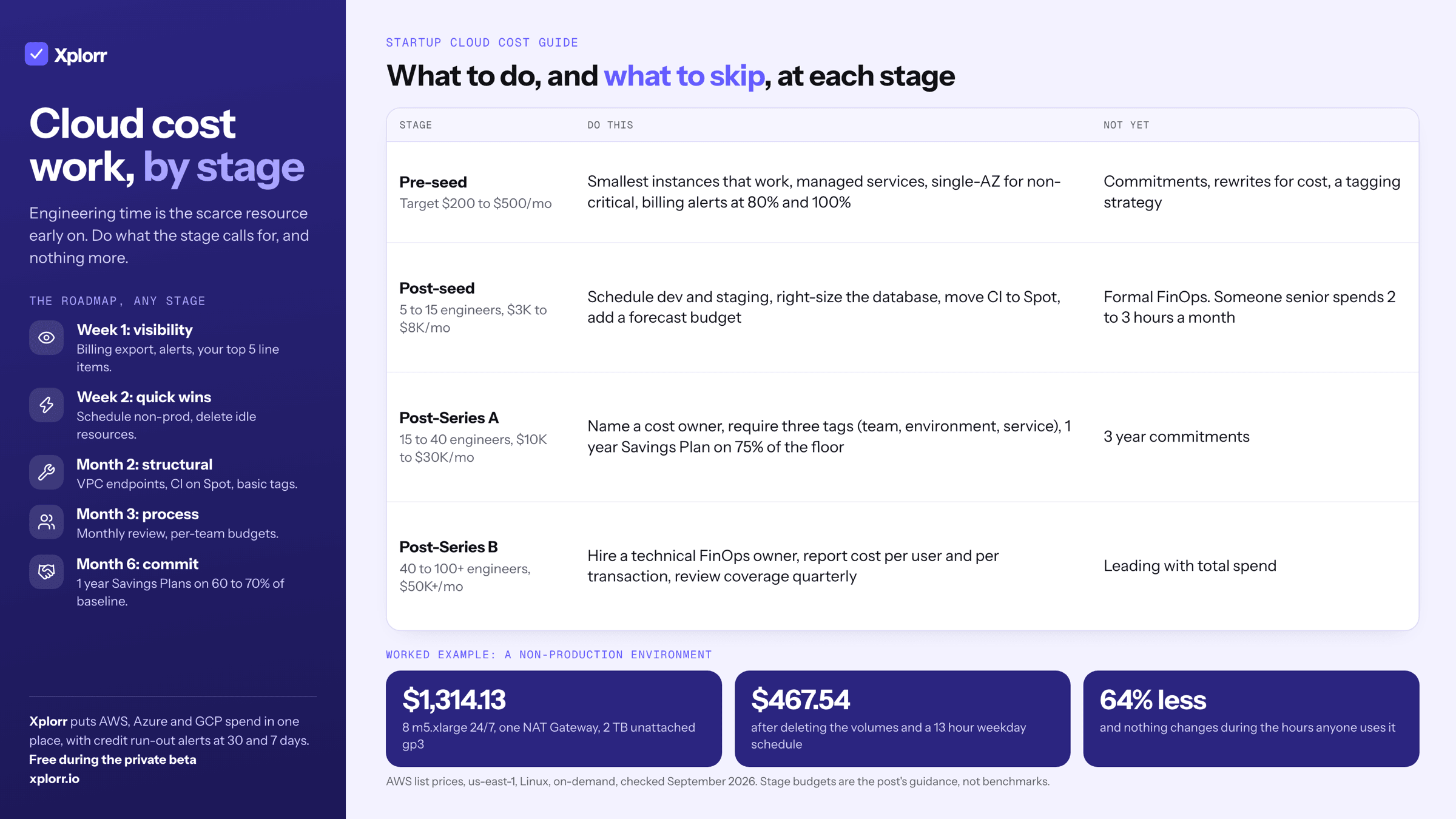
For startups, the right level of cloud cost work depends on stage. Pre-seed: small instances, managed services, billing alerts, and nothing else. Post-seed: schedule non-production, right-size the database, move CI to Spot. Post-Series A: name a cost owner, require three tags, evaluate a 1-year Savings Plan. Post-Series B: hire for it and track unit economics.
Startup bills rarely grow from one bad decision. They grow because a dozen reasonable ones never get revisited.
What Do Almost All Startups Over-Provision?
The database, usually before anything else. A founding engineer provisions a db.r6g.xlarge for a database holding 2 GB and serving 50 queries a second, reasoning that the headroom will be needed when things scale.
| RDS instance | PostgreSQL, Single-AZ | Monthly at 730 hrs |
|---|---|---|
db.t4g.medium |
$0.065/hr | $47.45 |
db.t4g.large |
$0.129/hr | $94.17 |
db.r6g.large |
$0.225/hr | $164.25 |
db.r6g.xlarge |
$0.45/hr | $328.50 |
Prices checked September 2026, us-east-1, Single-AZ. Multi-AZ roughly doubles each row.
A db.t4g.medium handles that workload comfortably, so the headroom costs $281.05 a month. The instinct makes sense in a world where provisioning takes weeks. In the cloud you can resize an RDS instance with five minutes of downtime and change an EC2 instance type in under a minute.
What Does Running Staging 24/7 Cost?
Your staging environment does not need to mirror production, and certainly not at this stage. It gets used by engineers during working hours, maybe 10 hours a day, 5 days a week.
There are about 730 hours in an average month. A 7am to 8pm weekday schedule, with a generous buffer at both ends, is 13 hours across roughly 21.75 weekdays, or about 283 hours. That is 39% of the clock.
So a staging environment costing $3,000/month running continuously costs about $1,160 on that schedule. Same configuration, same behavior during every hour anyone uses it, roughly $1,840 a month back.
This is the highest-return change available to most startups and the easiest to reverse if something goes wrong, which is why it belongs before anything architectural.
Is the AWS Free Tier Still Worth Using?
Partly, and less than it used to be. AWS restructured the free tier in July 2025. Accounts created since then get a Free Plan built on credits rather than the old 12-month service allowances: $100 on signup plus up to $100 more for completing activities, valid for six months.
The 12-month offers people still quote (750 hours of t3.micro, 750 hours of RDS db.t3.micro, 5 GB of S3) are not available on new accounts. If your account predates the change, check what you still have rather than assuming.
What is genuinely always free, on both plans, is worth knowing:
- 1 million Lambda requests and 400,000 GB-seconds of compute per month. If your workload fits Lambda, this is real free compute, perpetually.
- 25 GB of DynamoDB storage with enough read and write capacity for a small application.
Ten minutes checking which of your resources are eligible is still worth spending. Just do it against the current terms, not a blog post from 2023.
Why Do Billing Alerts Matter Most Early?
A surprising number of early-stage accounts have no billing alerts at all. The failure mode is always identical: you find out the bill spiked when the card is charged, sometimes weeks after the cost was incurred.
At pre-seed there is no FinOps process to catch it and no monthly review where someone notices. The alert is the entire control.
AWS Budgets takes five minutes to set up and costs nothing. There is no defensible reason not to have a threshold alert at 80% and 100% of expected monthly spend on every account, routed somewhere a person reads. Across more than one cloud, Xplorr’s budgets run monthly, quarterly or yearly with a forecast alert, and the FinOps tool for startups page covers the credit run out alerts that matter while you are spending AWS or Azure credits.
Pre-Seed: How Much Should Cloud Cost?
Under $500 a month. If it is significantly more at this stage, something specific is wrong and worth finding.
What to focus on:
- Smallest instance types that work.
t3.smallort3.mediumfor most workloads. Burstable instances suit early apps with low, spiky traffic. - Managed services over self-hosted. Do not run your own PostgreSQL on EC2. Use RDS. Do not manage Redis. Your time is worth more than the price difference at this scale.
- Single-AZ for non-critical workloads. Multi-AZ RDS roughly doubles the database line. If you can tolerate a few minutes of downtime during a rare AZ failure, keep the money.
- S3 Intelligent-Tiering from day one. It moves objects between tiers on access patterns, with no retrieval fee. Set it and forget it.
Budget target: $200 to $500/month for a low-traffic SaaS application.
Pre-Seed: What Should You Not Optimize?
Three things that look like good ideas and are not, yet:
- Reserved Instances or Savings Plans. You do not know what your infrastructure looks like in three months. Do not commit.
- Architecture changes made for cost. Do not rewrite a working Express API as Lambda functions to save $20 a month. Ship features.
- Granular cost allocation. With three engineers, everyone knows what is running. You do not need a tagging strategy yet.
The general rule at this stage is that engineering time is your scarcest resource and cloud spend is not. Any optimization that costs more than an afternoon is almost certainly the wrong call until the bill is large enough to notice.
Post-Seed: How Should You Set Up Budgets?
You have raised, you have 5 to 15 engineers, and the bill is probably $2,000 to $8,000 a month and climbing. Bad habits start costing real money here. You are not big enough for formal FinOps, but somebody senior needs two or three hours a month on the bill.
Go past a single threshold alert:
Example budget structure:
- Total: $6,000/month  -> alerts at $4,800, $6,000, $7,200
- EC2:   $2,500/month  -> alert at $3,000
- RDS:   $1,200/month  -> alert at $1,500
- Forecasted total: $6,000 -> alert if projected to exceed
The forecasted budget is the one that earns its keep. It tells you on day 15 that the month is going to overrun, instead of telling you on day 31 that it did.
Post-Seed: How Much Does Scheduling Non-Prod Save?
This is the single highest-return optimization at this stage.
Dev and staging should shut down outside business hours. AWS Instance Scheduler, a small Lambda, or a cron job that stops instances at 8pm and starts them at 7am all work. For Kubernetes, scale non-production node groups to zero overnight and at weekends.
The arithmetic: a 13-hour weekday schedule runs about 283 of the 730 hours in a month, so you pay for 39% of the compute. That is a 61% cut on anything you can switch off.
On a $3,000/month staging environment, that is about $1,840 back. Nothing about the environment changes during the hours anyone actually uses it, which is why this reverses cleanly if it turns out you were wrong about the schedule.
Post-Seed: How Do You Right-Size a Database?
RDS is typically the second-largest line item for startups. Three CloudWatch metrics tell you almost everything:
- CPUUtilization. Averaging below 20% means over-provisioned by at least one size
- FreeableMemory. Consistently 60% or more free means over-provisioned
- DatabaseConnections. Using 10% of max connections means you may be a tier too high
Using the table above, the common moves at this stage are db.r6g.xlarge to db.r6g.large (saving $164.25/month) or to db.t4g.large (saving $234.33/month if the workload tolerates burstable CPU).
The burstable question is the only real judgment call. A t4g instance accrues CPU credits when idle and spends them under load. Steady high CPU exhausts the credits and throttles. Spiky low-average CPU, which is most early startup traffic, suits it well.
Post-Seed: Should CI Run on Spot?
Yes, for almost every pipeline. CI workloads are interruptible (a retry is fine), short-lived and stateless. That is the textbook Spot use case.
AWS prices Spot capacity at up to 90% below on-demand, with the real discount varying by instance family, region and time of day.
Worked example: five m5.xlarge self-hosted GitHub Actions runners, busy 4 hours a day, is about 610 instance-hours a month. At the $0.192/hr on-demand list price that is roughly $117/month. At a 60% Spot discount the same runners cost about $47.
Prices checked September 2026, us-east-1, Linux.
If you use AWS CodeBuild instead, it already offers reserved capacity pricing for comparable savings without you managing instances.
Budget target: $3,000 to $8,000/month for 5 to 15 engineers with moderate traffic.
Post-Series A: Who Owns Cost?
You have 15 to 40 engineers, spend of $10,000 to $40,000 a month growing 10% to 20% month over month, and a board asking about gross margin. Cloud is now a meaningful share of burn.
Someone, ideally a senior infrastructure or platform engineer, should own cloud cost. Not as a full-time job, as an explicit named responsibility:
- Review the bill weekly, 15 minutes
- Run a monthly cost review with engineering leads, 30 minutes
- Maintain a backlog of optimization opportunities
- Keep basic cost visibility dashboards working
The word that matters there is named. Cost work that belongs to “the platform team” belongs to nobody, and reappears as a surprise line item two quarters later.
Post-Series A: Which Tags Do You Need?
Three. Not a taxonomy, just enough to answer “which team or service is this for?”
team: which engineering team owns itenvironment: prod, staging, devservice: which application it supports
Enforce them through your shared Terraform modules, by adding the required tags to the module interface, or through AWS SCPs that deny creation without them. Backfill existing resources with a one-time script rather than by asking people.
Three is deliberate. Every additional required tag lowers compliance on the whole policy, and at this stage unattributed spend costs you more than missing detail does. You can add a fourth when a specific decision needs it.
Post-Series A: When Should You Buy Savings Plans?
Once you have six months of consistent compute usage behind you and not before.
Compute Savings Plans are the flexible option: they apply to any EC2 instance type, plus Lambda and Fargate, in any region. AWS publishes up to 66% off on-demand at the 3-year All Upfront end, with 1-year terms discounting considerably less.
Look at your last six months of compute spend and find the floor, the lowest month. Cover roughly 75% of that floor, not your average and not your peak. An unused commitment is worse than on-demand, because you pay for the commitment and the on-demand usage both.
Do not buy 3-year commitments yet. Your infrastructure will look very different in three years. Stick to 1-year, No Upfront.
Post-Series A: What Does the First Cost Audit Find?
Run this once. Export the bill by service, sort by cost, and for each of the top 10 line items answer one question: do we know why this costs this much? Anything you cannot explain, dig into.
The findings are reliably mundane and reliably the same:
- Multiple staging environments, one per developer, running 24/7
- EBS volumes still attached to stopped instances
- An old prototype running in a separate AWS account nobody logs into
- RDS Multi-AZ enabled on the staging database
- CloudWatch Logs retention set to never expire, with six months of debug logs behind it
Budget target: $10,000 to $30,000/month, with a month-over-month trend that tracks business growth rather than infrastructure sprawl.
Post-Series B: Do You Need a FinOps Hire?
At 40 to 100-plus engineers and $50,000 to $200,000-plus a month, yes. One person, not a committee and not a shared responsibility, whose primary job is cloud cost.
That person should be technical, an engineer rather than a finance analyst, and should own:
- All cost visibility tooling and dashboards
- Monthly cost reviews with every engineering team
- Proactive identification of optimization opportunities
- Budgeting and forecasting alongside finance
- Unit economics reporting
The arithmetic is straightforward at this scale. At $50K a month, a 10% improvement is $60K a year, which covers a meaningful part of the role before counting anything the role prevents.
Post-Series B: Why Unit Economics Beat Total Spend?
Stop leading with total cloud spend and start with cost per active user, cost per transaction, and cost per customer tier.
These say whether infrastructure is scaling efficiently with the business. Total spend rising is fine when cost per customer is falling.
Worked through: spending $80,000/month for 10,000 active users is $8.00 per user. After optimization, $85,000/month for 15,000 users is $5.67 per user. Spend went up 6% and unit cost fell 29%.
That is the version of the number a board can act on. “Our cloud bill grew” invites a cost-cutting mandate. “Our cloud bill grew 6% while cost per user fell 29%” invites a growth conversation, which is usually the one you actually want to be having.
Post-Series B: How Do You Build a Reservation Strategy?
Methodically, and reviewed on a schedule:
- Analyze six months of usage data
- Identify the stable baseline: workloads that run consistently
- Cover 70% to 80% of that baseline with 1-year Savings Plans, No Upfront
- Use Spot for variable workloads: CI, batch processing, dev environments
- Keep 20% to 30% on-demand for flexibility and new workloads
- Review quarterly and adjust
What this blends out to depends entirely on your coverage mix. AWS publishes up to 66% off for Compute Savings Plans and up to 90% for Spot, so your effective rate is the weighted average of the proportions you land on, not a fixed headline number.
What Does the Cost-Saving Roadmap Look Like?
The practical sequence, regardless of current stage:
Week 1, visibility. Enable Cost Explorer or the equivalent billing export. Set billing alerts at 80%, 100% and 120% of current spend. Identify your top 5 line items.
Week 2, quick wins. Schedule non-production environments (a 13-hour weekday schedule cuts about 61% of non-prod compute). Delete idle resources: unattached volumes, unassociated Elastic IPs, empty load balancers. Right-size your single most over-provisioned instance.
Month 2, structural. Add VPC endpoints to cut NAT Gateway processing charges. Move CI to Spot. Set up basic tagging and enforce it on new resources. Reduce CloudWatch Logs retention.
Month 3, process. Run your first monthly cost review. Set per-team budgets at current spend plus a 10% growth margin. Create a cost optimization backlog in your tracker.
Month 6, commitments. Evaluate 1-year Savings Plans against six months of usage data. Cover 60% to 70% of stable baseline compute. Set up quarterly reservation reviews.
Then keep the monthly reviews, a quarterly deep-dive on hidden costs, and a unit economics update each month.
Worked Example: What Does a Non-Production Environment Cost?
You can put a number on most of this before changing anything. Take a non-production environment of eight m5.xlarge instances in us-east-1 running around the clock, one NAT Gateway, and 2 TB of unattached gp3 volumes left over from old experiments.
| Line item | List price | Monthly cost |
|---|---|---|
8 x m5.xlarge, 730 hrs |
$0.192/hr | 8 x 0.192 x 730 = $1,121.28 |
| 1 x NAT Gateway, hourly charge only | $0.045/hr | 0.045 x 730 = $32.85 |
| 2,000 GB unattached gp3 | $0.08/GB-month | 2,000 x 0.08 = $160.00 |
| Total | $1,314.13 |
Prices checked September 2026, us-east-1, Linux, on-demand.
Apply the two changes from this guide that need no architectural work.
Delete the orphaned volumes. Nothing is attached to them, so that is $160.00/month for free.
Schedule the instances to a 13-hour weekday window. About 283 of 730 hours, so 8 x 0.192 x 283 = $434.69 instead of $1,121.28, saving $686.59/month.
New total: $434.69 + $32.85 = $467.54/month, down from $1,314.13. A 64% reduction, and neither change touches how the environment behaves during the hours anyone uses it.
Run the same arithmetic against your own instance counts and hours before spending a sprint on anything cleverer. Start this week: open your billing console, sort by service, and pick the top item you cannot immediately explain. That is your first optimization.
Once you are running across more than one provider, which most startups are by Series B, consolidating that view matters more than any single fix. A tool like Xplorr puts AWS, GCP and Azure spend in one place with anomaly detection across all three.
Keep reading
- How to Cut Your AWS Bill in One Week: A Practical Checklist
- Hidden Cloud Costs You’re Probably Missing Right Now
- Building a FinOps Practice That Engineers Actually Follow
See how Xplorr helps → Features
Xplorr shows your AWS, Azure and GCP spend in one place, with anomaly detection, budgets and rightsizing recommendations. Get started free.
Written by
Xplorr team
The people who build Xplorr
Written together by the engineers who build Xplorr: the AWS, Azure, GCP and Kubernetes collectors, the console, and the alerting behind them.
About Xplorr